
Video Information System
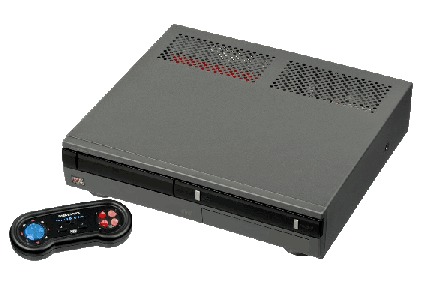
The Tandy Memorex Video Information System (VIS) is an interactive, multimedia CD-ROM player produced by the Tandy Corporation starting in 1992. It is similar in function to the Philips CD-i and Commodore CDTV systems (particularly the CDTV, since both the VIS and CDTV were adaptations of existing computer platforms and operating systems to the set-top-box design). The VIS systems were sold only at Radio Shack, under the Memorex brand, both of which Tandy owned at the time.
This system scrapes metadata for the “vis” group and loads the vis set from the currently selected theme, if available.
Quick reference
BIOS
Requires MAME BIOS file vis.zip in either vis or BIOS folder.
| BIOS file | Location | MD5 |
|---|---|---|
vis.zip | /userdata/bios/vis.zip or /userdata/roms/vis/ | |
p513bk0b.bin | inside vis.zip | ebf432d3b09f694db1c62018eb2ab471 |
p513bk1b.bin | inside vis.zip | 758f8fec271fbf526bb22b36e88f154b |
ROMs
Place your VIS ROMs in /userdata/roms/vis.
Emulators
libretro/mame
MAME, the Multiple Arcade Machine Emulator, is a multi-purpose emulation framework which facilitates the emulation of vintage hardware and software. Originally targeting vintage arcade machines, MAME has since absorbed the sister-project MESS (Multi Emulator Super System) to support a wide variety of vintage computers, video game consoles and calculators as well. MAME doesn't use an individual “core” for each system like RetroArch does, instead the ROM itself usually contains the necessary information to accurately emulate it, thus making it specific to the version of MAME it was made for. Overall it's a very complicated subject, we have a guide specific to arcade just for it.
libretro/mame configuration
| ES setting name | Description ⇒ ES option |
|---|---|
| OVERCLOCK (UNSTABLE) | Reduces system slowdown. May cause issues in some games. ⇒ default, 30 - 150. |
| RENDERING RESOLUTION | Increase the rendering resolution. Makes 3D objects clearer. ⇒ 640×480, 800×600, 960×720, 1024×768, 1280×720, 1600×800, 1920×1080, 2560×1440, 3840×2160. |
| SPECIAL CONTROL LAYOUTS | Controls for 5/6 button games and other unique controls ⇒ Default Only default, SNES Style snes, Genesis/Megadrive Style megadrive, Modern Fightstick Style fightstick, Neo Geo Mini Pad neomini, Neo Geo CD Pad neocd, Twin Stick with Triggers twinstick, Rotated 4-Way Stick (Q*Bert) qbert. |
| HIGH SCORE PLUGIN | Enable or disable high score saving. ⇒ Enabled (Default) 1, Disabled 0. |
| COIN SOUND PLUGIN | Play a coin drop sound effect when an insert coin button is pressed. ⇒ Enabled 1, Disabled (Default) 0. |
Controls
Here are the default VIS's controls shown on a Batocera RetroPad:

Troubleshooting
Further troubleshooting
For problems with MAME specifically, there are some tips on the troubleshooting section on MAME's system page.
For further troubleshooting, refer to the generic support pages.
- systems/vis.txt
- Last modified: 6 months ago
- by wizzard