This is an old revision of the document!
Nintendo Wii U
The Wii U is an eighth-generation console released by Nintendo on November 18, 2012 at $349.99. It has a Tri-Core IBM PowerPC CPU at 1.24 GHz with 2GB of RAM. It has a AMD Radeon GPU. It is the first console by Nintendo to output to high definition (HD) resolutions, such as 720p and 1080p. It includes a tablet-like controller, known as the Wii U GamePad, to provide certain additional gameplay. Notably, it can play all Wii games as well as support the Wii Remote controllers for native Wii U games.
| shortname | wiiu |
|---|---|
| emulator/core(s) | Cemu |
| rom format(s) | .wup .wud .wux .rpx |
Emulators
Cemu
Cemu is a closed-source Wii U emulator created in October 2015 and is regularly updated every 2 to 5 weeks. It can launch or play a lot of commercial games, 10% of tested titles are perfect and 35% are, at least, playable which sums to 45% of total tested titles, with varying degrees of glitches for the imperfect ones. Check out the up-to-date official compatibility list for more information.
As the emulator is distributed as a precompiled binary for Windows Batocera runs Cemu through Wine like Windows games. This has no impact on compatibility and is well tested.
Configuration
Cemu offers a lot of custom configuration options. You can set most of them within the cemu-config application found in the Batocera menu application (press [F1] on your keyboard, from the main systems menu in EmulationStation).
Graphic options
Cemu works best with Vulkan drivers if your GPU can support it.
For most games Community graphic packs are available.
Unlike the name suggests these are not only graphic enhancements but also mods and patches that make the game more stable or playable. Most Wii U games run in 720p; the graphic packs allow to run games in 1080p or even in higher resolutions. They are highly recommended.
To download and use the community graphic packs follow these steps in cemu-config:
- right-click a game and select
Edit graphic packs - select
Download latest community graphic packsYou need to be connected to the internet. - choose and enable the graphic packs / mods / cheats etc. that you want
- press
ALT+F4to exit the window
The Cemu Wiki offers tons of well documented guides and optimizations for specific games - just use the search function on that wiki to find your desired game guide.
Shader caches
When your game is loaded, check for its ID on the title bar in front of “SaveDir:” and note it down. The directory where transferable shader caches are stored is \userdata\system\configs\cemu\shaderCache.
They're generated the first time you play through a game and at that time cause noticeable stuttering. You can download a complete cache from places like here and rename them to match your game version's ID to spare yourself most of that unpleasant experience. Just keep in mind that shader caches from versions older than 1.8.0 are incompatible with later versions of Cemu.
Custom per game settings
Some games require custom game profile settings (often to use the CPU mode “single-core recompiler instead of auto).
To create customized game profiles follow these steps in cemu-config:
- right-click a game and select
Edit game profile - change the game settings as needed
- press
ALT+F4to exit the window
Again the Cemu Wiki offers tons of well documented guides and optimizations for specific games - just use the search function on that wiki to find your desired game guide.
Your changes are stored temporary in the folder /usr/cemu/gameProfiles.
To save the change permanently in the Linux overlay (after reboot) it is currently necessary to enter the command batocera-save-overlay via the terminal.
For more information you can also read the topic Modify the system while it's running
ROMs
Place your Nintendo Wii U ROMs in /userdata/roms/wiiu/.
You can use the following ROM formats:
wup: an installer format for titles to be installed on the Wii U console - not recommended.wud: a single file, which is a direct physical game dump, this format requires an accuratekeys.txtfile.wux: single-file compressed versions of.wuddumps, this format requires an accuratekeys.txtfile.Loadiine: a directory structure with multiple files and folders, usually shared as an archive. You must unpack the archive and place the containing folder in the ROMs directory. This format is a decrypted version of.wuddumps. Batocera will use the[game].rpxbinary file in the/code/directory structure of the Loadiine unarchived ROM to launch the game.
keys.txt
You need a text file named keys.txt. This file needs to go in the /userdata/bios/cemu/ folder. If you have a pop-up window telling you “Error in keys.txt line XX”, it might be because your keys.txt file is not correctly located in /userdata/bios/cemu/.
This keys.txt is a plain text file containing several lines, one for the common Wii U key, plus one for each game you want to support. # is used for comments.
Google is your friend if you want a Wii U keys.txt pre-filled with many games. Check out the Cemu wiki for more information.
DLCs & Updates
Some games need an update to be playable via Cemu or maybe you want to install available DLCs for a game.
You can install them easily with cemu-config. First make sure that you connected an external drive or a network share with the installation files or copied them to the Batocera share.
- select
File→Install game update or DLC - select the
meta.xmlin the meta folder of the update or DLC - wait for the installation process
The installed DLC and game version will be shown in the game list of the cemu-config application. The installation files are stored in /userdata/saves/cemu/drive_c/cemu/usr/<titleid>. Your original rom file or folder will never be touched.
Controls
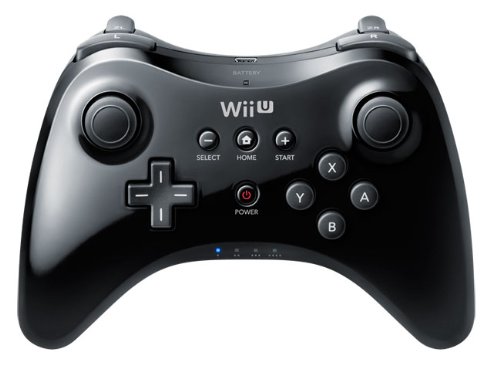 If you are using a XBOX One Controller the mapping to the Wii U (Pro) Gamepad is really easy. The most buttons are as expected, only the following are different:
| XBOX One Controller | Wii U Gamepad |
|---|---|
| A | B |
| B | A |
| X | Y |
| Y | X |
| XBOX Guide | Home |
Gamepad view
The default Wii U Gamepad offers an integrated touchscreen. You can access the gamepad view by press and hold the TAB key on your keyboard.
With your mouse + left mouse button you can simulate pressing the touchscreen.
Gamepad motion control
Some games require the motion control function of the gamepad (e.g. Splatoon forces you to use motion control in the tutorial if you start the game for the first time)
Cemu emulates motion control via mouse gesture + right mouse button
 add wiimote support
Troubleshooting
Migration v30 to v31
After you make upgrade of batocera in v31 you need to move your backups.
mkdir -p /userdata/saves/cemu/drive_c/cemucp -a /userdata/saves/cemu/sys /userdata/saves/cemu/drive_c/cemucp -a /userdata/saves/cemu/usr /userdata/saves/cemu/drive_c/cemu
- systems/wiiu.1622831565.txt.gz
- Last modified: 5 years ago
- by igno2k