This is an old revision of the document!

Nintendo Wii
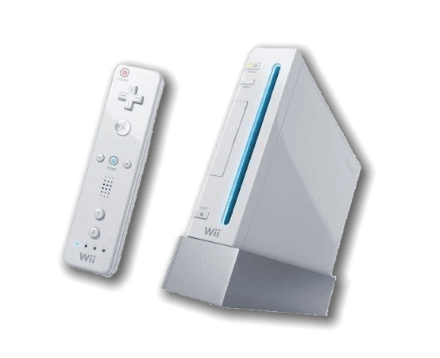
The Nintendo Wii is a console developed by Nintendo. It was released on November the 19th, 2006 and retailed for $249.99 USD.
The Wii sports a IBM PowerPC CPU at 729 MHz with 88MB of RAM, and a GPU infamously created by ATI (Wii consoles have “ATI” printed on its shell) dubbed the “Hollywood” chip. Its internal architecture is very similar to its predecessor, the GameCube, so Dolphin supports running both Wii and GameCube games. In fact, some GameCube games can be more difficult to run than Wii games.
Dolphin is pretty much the only Wii emulator.
This system scrapes metadata for the wii group and loads the wii set from the currently selected theme, if available.
Quick reference
- Emulator: Dolphin
- Accepted ROM formats:
.gcm,.iso,.gcz,.ciso,.wbfs,.wad,.rvz,.elf,.dol,.m3u,.json - Folder:
/userdata/roms/wii
BIOS
No Nintendo Wii emulator in Batocera needs a BIOS file to run.
ROMs
Some users have reported issues with using regular traditional controllers as Wiimotes in Wii games if the game loaded has the .cc.rvz extension. Renaming this extension to .nkit.iso solved the issue for them (no actual conversion was done, just renaming).
Place your Wii ROMs in /userdata/roms/wii.
If you have a Riivolution patch, first create its JSON file as outlined on the Dolphin emulator page.
Emulators
Dolphin
For general information about the Dolphin Emulator itself, you can also visit the Dolphin emulator page instead.
Dolphin configuration
ES setting name batocera.conf key | Description ⇒ ES option key value |
|---|---|
| Settings that apply to all cores of this emulator | |
GRAPHICS BACKEND wii.gfxbackend | Choose your graphics rendering ⇒ OpenGL OGL, Vulkan Vulkan. |
UBERSHADERS wii.ubershaders | Improve performance with Ubershaders. Ubershaders take advantage of your GPU to avoid in-game stutters as it generates shaders for the first time; this can happen when a certain special effect shows on the screen or a new model is rendered. Hybrid ubershaders are preferred, it will use the GPU accelerated ubershader if available to avoid stutter, otherwise it will fall back to traditional shader generation. Exclusive ubershaders will only use ubershaders, only activate this option if you have an extremely powerful GPU. Normally there is no downside to activating ubershaders, however it does increase the minimum requirements out of your GPU to run. On especially weak hardware, such as SBCs, ubershaders are disabled by default. They can still be manually turned on, but you may encounter more stutter if on an SBC. Skip draw is a hack that opts to take a different approach altogether: don't display the object in game if its shader hasn't compiled yet. Obviously, this can result in visual glitches, but may be the best option performance-wise if your hardware is extremely weak.; asynchronous is preferred, synchronous is more compatible ⇒ No Ubershaders no_ubershader, Exclusive Ubershaders exclusive_ubershader, Hybrid Ubershaders hybrid_ubershader, Skip Drawing skip_draw. |
PRE-CACHE SHADERS wii.wait_for_shaders | Wait for shaders to compile completely before starting the game, can reduce micro-freezes ⇒ Off (default) 0, On 1. |
PERFORMANCE HACKS gamecube.perf_hacks | Increase emulator performance, at the cost of accuracy/stability. Settings set to “True” with this option: Defer EFB copies to RAM DeferEFBCopies, Scaled EFB Copy EFBScaledCopy, EFB Copies EFBToTextureEnable, Skip Presenting Duplicate Frames SkipDuplicateXFBs, XFB copies XFBToTextureEnable, Force Texture Filtering ForceFiltering, Arbitrary Mipmap Detection ArbitraryMipmapDetection, Disable Copy Filter DisableCopyFilter, Force 24-Bit Color ForceTrueColor. Settings set to “False” with this option: Bounding Box BBoxEnable, Ignore Format Changes EFBEmulateFormatChanges.⇒ Off 0, On 1. |
USE PAD PROFILES wii.use_pad_profiles | Search for custom configured joystick profiles ⇒ Off 0, On 1. |
VIDEO RESOLUTION wii.internal_resolution | Improve the fidelity of 3D models (does not affect 2D sprites) ⇒ 1x native (640×528) 1, 2x 720p (1280×1056) 2, 3x 1080p (1920×1584) 3, 4x 1440p (2560×2112) 4, 5x (3200×2640) 5, 6x 4K (3840×3168) 6, 7x (4480×3696) 7, 8x 5K (5120×4224) 8. |
ANISOTROPIC FILTERING wii.anisotropic_filtering | Enhance the quality of distant perspective textures ⇒ Off 0, 2x 1, 4x 2, 8x 3, 16x 4. |
DUAL CORE MODE wii.dual_core | Usually not much faster than single core mode ⇒ Off 0, On 1. |
GPU SYNC wii.gpu_sync | Speed hack for dual core mode to fix some glitches ⇒ Off 0, On 1. |
ANTI-ALIASING wii.antialiasing | Smooth out jagged edges on 3D object polygons ⇒ Off 0, 2x 2, 4x 4, 8x 8. |
ANTI-ALIASING MODE wii.use_ssaa | Toggle MSAA/SSAA. Depends on anti-aliasing being enabled. ⇒ MSAA (default) 0, SSAA 1. |
HIRES TEXTURES wii.hires_textures | Use HD texture packs ⇒ Off 0, On 1. |
WIDESCREEN HACK wii.widescreen_hack | You must use a 16/9 RATIO to work ⇒ Off 0, On 1. |
ENABLE CHEATS wii.enable_cheats | To use game cheats or 16/9 Aspect Ratio Fix codes ⇒ Off 0, On 1. |
MEMORY MANAGEMENT UNIT wii.enable_mmu | Allows many games to boot and work properly ⇒ Off 0, On 1. |
FAST DISK SPEED wii.enable_fastdisc | Speeds up disc speed to remove any loading ⇒ Off 0, On 1. |
VSYNC wii.vsync | Fix the heavy screen tearing in games (CPU heavy) ⇒ Off 0, On 1. |
DUALSHOCK MOTION CONTROL wii.dsmotion | Emulate the Wii pointer with your DS4's gyroscope ⇒ Off 0, On 1. |
MOUSE AS IR WIIMOTE wii.mouseir | Emulate the Wiimote IR control with a mouse ⇒ Off 0, On 1. |
RUMBLE wii.rumble | To use vibration on games with Rumble mode ⇒ Off 0, On 1. |
Settings specific to wii | |
EMULATE WIIMOTE wii.emulatedwiimotes | Use your gamepad like a vertical Wiimote in game ⇒ Off 0, On 1. |
CUSTOMIZE WIIMOTE & GAMEPAD wii.controller_mode | Emulate a Wiimote Sideway with L2 for Shake and Nunchuk on R-stick ⇒ Off disabled, Classic Controller cc, Wiimote Sideway side, Wiimote Sideway + Swing is, Wiimote Sideway + Tilt it, Wiimote Sideway + Nunchuk in. |
RetroArch
RetroArch has its own page.
libretro: dolphin
There's nothing here to configure. Use RetroArch's Quick Menu for now.
Controllers for the Wii

You have two choices to use controllers for playing Wii on Batocera.
- Wiimote: Use original Wiimote controllers with a bluetooth controller (the DolphinBar usage is discouraged)
- Gamepad: Use standard gamepads with analog stick for games that can originally be played with Wii Classic Controller and GC Controller.
Due to problems of the IR LEDs burning out from staying on too long, the v5 firmware released in late 2015 turns off the DolphinBar's IR LED lights when they are not needed, such as when no Wiimotes are connected or when the DolphinBar is in a mode where the pointer cannot be used. But unlike the old problematic sensor bars that turned off after a set time, the DolphinBar knows when the wiimote is being used, so it presents no problems. To anyone who hasn't updated their DolphinBars to a version with this feature, we definitely recommend that they do so. W010 Firmware.
Configuring a real Wiimote with a DolphinBar

It's really easy:
- Connect your DolphinBar with USB to your computer
- Press the right button to choose MODE 4, the Wii specific mode
- Press the left button to launch pairing
- Press the buttons 1 and 2 on your Wiimote
- The bar led stop to flash and on the Wiimote led 1 is now fixed
Repeat for each Wiimote the same things and you are ready to play, nothing more to do.
Using Wii controllers as regular controllers for other systems with Mode 3
If you use the DolphinBar in MODE 3, it allows you to use a Wiimote, Wiimote + Nunchuk, or a Wii Classic Controller as a normal GameCube gamepad that you can configure in Batocera like any other pad. Mode 3 will work with all other emulators and can save you if you don't have any other controller. But, the Wiimote, Wiimote + Nunchuk, and Classic Controller have all different button assignments, even for things that seem obvious like the D-pad. If you plug or unplug a different device, you'll have to make adjustments to your controller configuration stored in Batocera because they have all the same name HJZ Mayflash Wiimote PC Adapter.
Using Bluetooth passthrough
This is the default configuration. No action needed.
Configuring another controller to simulate a Wiimote/Wii Classic Controller/GameCube controller
If you don't have any Wiimote controllers and want to use a regular controller, it's possible, but you will be limited to games already made for Wii Classic Controller and GC Controller.
You can turn this option on by going to advanced system settings for the Nintendo Wii > Emulate Wiimote to “On”. You can also manually edit your batocera.conf file in /userdata/system/ (or system in the SHARE NFS network drive) and turn on wii.emulatedwiimotes=1 like so:
  ## wiimotes
  ## real wiimotes must not be paired with batocera.linux system so that they can work with the wii emulator
  ## set emulatedwiimotes to 1 to emulate wiimotes with standard pads
  wii.emulatedwiimotes=1
Removing the # at the line start will 'uncomment' the line.
Now your controllers will be recognized like Wiimotes to play games, but if you try one like New Super Mario Bros you will be stuck when it will ask you to shake your pad to fly with your hat. See further down for more information.
Below is the default key mapping for Dolphin/Wii games. This is as if you are using a Wiimote in vertical orientation.
| Key | Wii Function | Key | Wii Function | Key | Wii Function | Key | Wii Function |
|---|---|---|---|---|---|---|---|
| x | Buttons/2 | y | Buttons/1 | a | Buttons/B | b | Buttons/A |
| l1/pageup | Buttons/- | l2/pagedown | Buttons/+ | select | Buttons/Home | start | |
| joystick1up | IR/Up | joystick1left | IR/Left | joystick1down | IR/Down | joystick1right | IR/Right |
| joystick2up | Tilt/Forward | joystick2left | Tilt/Left | joystick2down | Tilt/Down | joystick2right | Tilt/Right |
But playing with your gamepad in vertical orientation is really crappy…
Pre-built modifications have been baked into the configuration utility in order to support various games and remote orientation. In order to use these modifications you need to rename the ROM file to include one of the following extensions in the filename, as described below. You need to change the ROM filename, like for example New Super Mario Bros.side.iso.
- .side. - Enables the controller to operate as a sideways wiimote. The following changes to the default configuration are enabled:
| Key | Wii Function | Key | Wii Function | Key | Wii Function | Key | Wii Function |
|---|---|---|---|---|---|---|---|
| x | Buttons/B | y | Buttons/A | a | Buttons/1 | b | Buttons/2 |
- .cc. - Enables the controller to operate as a classic controller. The game must support the classic controller. The following changes to the default configuration are enabled:
| Key | Wii Function | Key | Wii Function | Key | Wii Function | Key | Wii Function |
|---|---|---|---|---|---|---|---|
| x | Buttons/X | y | Buttons/Y | a | Buttons/A | b | Buttons/B |
| select | Buttons/- | start | Buttons/+ | l1/pageup | Triggers/L | r1/pagedown | Triggers/R |
| l2 | Buttons/ZL | r2 | Buttons/ZR | ||||
| up | Classic/D-Pad/Up | down | Classic/D-Pad/Down | left | Classic/D-Pad/Left | right | Classic/D-Pad/Right |
| joystick1up | Classic/Left Stick/Up | joystick1down | Classic/Left Stick/Left | joystick2up | Classic/Right Stick/Up | joystick2left | Classic/Right Stick/Left |
- .XX. - Enables the controller to operate with the left joystick representing the function represented by first character and the right joystick functioning as represented by the second. The options are as follows:
| Code | Function | Description |
|---|---|---|
| i | infrared | Infrared Options. In this option, the selected joystick will act as if you were moving the infrared around |
| s | swing | In this option, the selected joystick will act as if you were swinging it in the direction you're pushing the joystick |
| t | tilt | In this option, the selected joystick will act as if you were tilting it in the direction you're pushing the joystick |
| n | nunchuk | In this option, the selected joystick will act as the joystick on the nunchuk and l2 = C and r2 = Z |
- Custom - Additional configuration available on a per-game basis, mapping any of the possible keys to the keymappings in Dolphin. The file name needs to be named the same as the ROM with .cfg added to the end. For example, to modify
New Super Mario Bros.iso, a configuration file could look as follows:
- New Super Mario Bros.iso.cfg
'r2':'Shake/Z'
'pageup':'Tilt/Left'
'pagedown':'Tilt/Right'
'select':'Buttons/-'
'start':'Buttons/+'
NEW: From the 5.26+ (beta 14/04/2020) you can now SHAKE in game with L2 Key, for example to play New Super Mario World while using .side. Wiimote orientation.
Classic Controller compatible games list
The following Wii games are compatible with the Classic Controller, and you can play them with this patch.
Blast Works: Build Trade Destroy
Bleach: Versus Crusade
Call of Duty: Black Ops
Call of Duty: Modern Warfare 3
Castlevania Judgment
Dokapon Kingdom
Dragon Ball Z: Budokai Tenkaichi 2
Dragon Ball Z: Budokai Tenkaichi 3
Fifa 09
Fifa 10
Fifa 15
Final Fantasy Crystal Chronicles: Echoes of Time
Fire Emblem: Radiant Dawn
Geometry Wars Galaxies
G.I. Joe: The Rise of Cobra
Grim Adventures of Billy & Mandy, The
Guilty Gear XX Accent Core
Harvest Moon: Tree of Tranquility
Kirby's Dream Collection
Mario Kart Wii
MLB Power Pros
MLB Power Pros 2008
Mortal Kombat: Armageddon
Monster Hunter Tri
Muramasa: The Demon Blade
MySims Racing
Naruto: Clash of Ninja Revolution 1
Naruto Shippuden: Clash of Ninja Revolution 3
Naruto Shippuuden Gekitou! Ninja Taisen EX
Naruto Shippuuden Gekitou! Ninja Taisen EX2
Naruto Shippuuden Gekitou! Ninja Taisen EX3
Need for Speed: Undercover
Newer Super Mario Bros Wii [HACK]
NHL 2k10
NiGHTS: Journey of Dreams
No More Heroes 2
Opoona
Pro Evolution Soccer 2009
Rampage: Total Destruction
Resident Evil Archives: Resident Evil
Resident Evil 4 Wii Edition
Rune Factory Frontier
Samurai Shodown Anthology
Sengoku Basara: Samurai Heroes
SNK Arcade Classics Vol. 1
Sonic Colors
Sonic Unleashed
SpongeBob's Truth or Square
Super Mario Kart Wii
Super Smash Bros. Brawl
Taiko No Tatsujin
Tatsunoko vs. Capcom: Cross Generation of Heroes
Teenage Mutant Ninja Turtles: Smash-Up
Tetris Party Deluxe
The Last Story
TNA Impact
Ultimate Shooting Collection
WWE SmackDown vs. Raw 2010
Victorious Boxers Revolution
Virtual Console Games
Pro Evolution Soccer 2010 ???????
Xenoblade Chronicles
Zhu Zhu Pets: Featuring the Wild Bunch
Troubleshooting
There are infrequent frame-drops in my games despite them running at full-speed most of the time
Your GPU might not be strong enough to calculate the caches in real-time while playing. This can be worked around by activating the PRE-CACHE SHADERS wii.wait_for_shaders setting, at the cost of having to wait a while on your next launch of the game (one time only).
It's still happening!
For exceptionally weak hardware, it might also be worth turning off UBERSHADERS wii.ubershaders altogether.
I have X problem with Y game
Dolphin has a great and informative wiki, usually detailing which settings may need to be altered to avoid issues in certain games. Search for your game on it here: https://wiki.dolphin-emu.org/index.php?title=Main_Page
Further troubleshooting
For further troubleshooting, refer to the generic support pages.
- systems/wii.1661235887.txt.gz
- Last modified: 4 years ago
- by nadenislamarre