This is an old revision of the document!

Vectrex
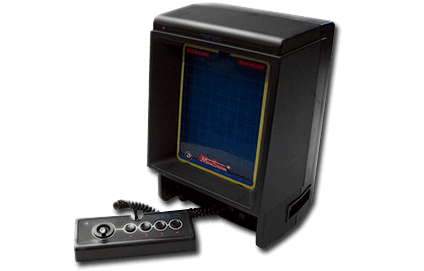
The Vectrex is a second-generation home console developed by Smith Engineering and manufactured by GCE, followed by Milton Bradley. It was released in 1982, retailing for $199 USD ($569 in 2021).
The Vectrex features an integrated monochrome CRT monitor, but this isn't just any CRT monitor that scans left-to-right, top-to-bottom. Instead, the electron beam is able to shoot freely across the face of the entire phosphor screen, from any angle, up to the length of the monitor. In essence, this is producing vector graphics as they are literally being generated on the machine. To this date, the Vectrex is the only vector display-based console released for the home market ever.
The Flatten-glow shader set is highly recommended to recreate this effect as it would have originally appeared.
Every game came with a color overlay sheet to be placed in front of the screen, adding static areas of color and/or on-screen decorations/HUD elements.
Being released one year before the NA videogame crash of '83 doomed its fate, being discontinued entirely by 1984 with Milton Bradley (the then current manufacturers of the Vectrex) merging with Hasbro. The Vectrex is considered a commercial failure, however despite this the system was praised for its software library, unique and novel method of rendering graphics, and built-in monitor. It was technically also the first console to feature a 3D-based peripheral.
This system scrapes metadata for the “vectrex” group and loads the vectrex set from the currently selected theme, if available.
Quick reference
- Emulator: RetroArch
- Core: libretro: vecx
- Folder:
/userdata/roms/vectrex - Accepted ROM formats:
.bin,.gam,.vec,.zip,.7z
BIOS
BIOS is not required for libretro: vecx, the default emulator.
For MAME emulator, BIOS is required:
| MD5 checksum | Share file path | Description |
|---|---|---|
ab082fa8c8e632dd68589a8c7741388f | bios/vectrex.zip | exec_rom.bin |
a9c238473229912eb757ff3dfe6f4631 | bios/vectrex.zip | exec_rom_intl_284001-1.bin |
ROMs
Place your Vectrex ROMs in /userdata/roms/vectrex.
Emulators
RetroArch
RetroArch (formerly SSNES), is a ubiquitous frontend that can run multiple “cores”, which are essentially the emulators themselves. The most common cores use the libretro API, so that's why cores run in RetroArch in Batocera are referred to as “libretro: (core name)”. RetroArch aims to unify the feature set of all libretro cores and offer a universal, familiar interface independent of platform.
RetroArch configuration
RetroArch offers a Quick Menu accessed by pressing [HOTKEY] +  which can be used to alter various things like RetroArch and core options, and controller mapping. Most RetroArch related settings can be altered from Batocera's EmulationStation.
Standardized features available to all libretro cores: vectrex.videomode, vectrex.ratio, vectrex.smooth, vectrex.shaders, vectrex.pixel_perfect, vectrex.decoration, vectrex.game_translation
ES setting name batocera.conf_key | Description ⇒ ES option key_value |
|---|---|
| Settings that apply to all cores of this emulator | |
GRAPHICS BACKEND vectrex.gfxbackend | Choose your graphics rendering ⇒ OpenGL opengl, Vulkan vulkan. |
AUDIO LATENCY vectrex.audio_latency | Audio latency in milliseconds, turn it up if you hear crackles ⇒ 256 256, 192 192, 128 128, 64 64, 32 32, 16 16, 8 8. |
THREADED VIDEO vectrex.video_threaded | Improves performance at the cost of latency and more video stuttering. Use only if full speed cannot be obtained otherwise. ⇒ On true, Off false. |
libretro: vecx
A libretro port of the open-source vecx emulator. Originally created by Valavan Manohararajah.
libretro: vecx configuration
ES setting name batocera.conf_key | Description ⇒ ES option key_value |
|---|---|
| Settings that apply to all systems this core supports | |
RESOLUTION MULTIPLIER global.res_multi | Resolution multipliers to smooth vectors. ⇒ Off 1, 2 2, 3 3, 4 4. |
MAME
MAME, the Multiple Arcade Machine Emulator, is a multi-purpose emulation framework which facilitates the emulation of vintage hardware and software. Originally targeting vintage arcade machines, MAME has since absorbed the sister-project MESS (Multi Emulator Super System) to support a wide variety of vintage computers, video game consoles and calculators as well. MAME doesn't use an individual “core” for each system like RetroArch does, instead the ROM itself usually contains the necessary information to accurately emulate it, thus making it specific to the version of MAME it was made for. Overall it's a very complicated subject, we have a guide specific to arcade just for it.
MAME configuration
MAME offers a Menu in-game ([HOTKEY] + or [Tab] on the keyboard). This can be used to manually adjust inputs or game settings. If you're having issues with a specific game, check the MAMEdev FAQ for that game here. For MESS systems specifically, you might find more information on MESS's wiki. All options can also be edited by opening the mame.ini file.
Standardized features available to all versions of this emulator: vectrex.videomode, vectrex.padtokeyboard, vectrex.videomode, vectrex.bezel, vectrex.bezel_stretch, vectrex.hud, vectrex.hud_corner, vectrex.bezel.tattoo, vectrex.bezel.tattoo_corner, vectrex.bezel.tattoo_file, vectrex.bezel.resize_tattoo, vectrex.use_guns
ES setting name batocera.conf_key | Description ⇒ ES option key_value |
|---|---|
| Settings that apply to all versions of this emulator | |
VIDEO MODE vectrex.video | BGFX for post-processing, accel/opengl for raw image. ⇒ BGFX bgfx, Accel accel, OpenGL opengl. |
VSYNC vectrex.vsync | Fix screen tearing, but may drop frames. ⇒ Off (Default) 0, On 1. |
BGFX GRAPHICS API vectrex.bgfxbackend | Depends on video mode being set to BGFX. Vulkan is better, when supported. ⇒ MAME Detect automatic, OpenGL opengl, OpenGL ES gles, Vulkan vulkan. |
BGFX VIDEO FILTER vectrex.bgfxshaders | Apply a post-processing effect. ⇒ Off None, Bilinear default, CRT Geom crt-geom, CRT Geom Deluxe crt-geom-deluxe, CRT Geom Deluxe (RGB) crt-geom-deluxe-rgb, CRT Geom Deluxe (Composite) crt-geom-deluxe-composite, Super Eagle eagle, HLSL hlsl, HQ2X hq2x, HQ3X hq3x, HQ4X hq4x. |
CRT SWITCHRES vectrex.switchres | Allows the use of switchres profiles if present. ⇒ Off 0, On 1. |
VERTICAL ROTATION (TATE) vectrex.rotation | Rotates screen by 90 degrees. Intended for rotating displays. ⇒ Off None, Rotate 90 autoror, Rotate 270 autorol. |
ARTWORK CROP vectrex.artworkcrop | Crop artwork to only unused space, keeping the game as large as possible. ⇒ Off (Default) 0, On 1. |
CUSTOM MAME CONFIG vectrex.customcfg | Set system-wide controls via MAME menu ⇒ On 1, Off 0. |
DATA PLUGIN vectrex.dataplugin | Make game history, setup instructions, and special moves viewable in the menu ⇒ Enabled 1, Disabled (Default) 0. |
OFF-SCREEN RELOAD BUTTON vectrex.offscreenreload | Set gun button 2 to reload. ⇒ On 1, Off (Default) 0. |
Settings specific to vectrex |
|
SOFTWARE LIST vectrex.softList | Use MAME software lists to identify ROM ⇒ Don't Use (Default) none, GCE Vectrex cartridges vectrex. |
CUSTOM GAME CONFIG vectrex.pergamecfg | Enable per-game custom configuration via MAME menu. ⇒ On 1, Off 0. |
Resolution multiplier
Translating vector-based games to a traditional pixel grid screen is never going to be 1:1 perfect, as the nature of how vectors are drawn versus pixels are incompatible. There will always be a level of “staircase” effect with any lines that aren't perfectly perpendicular with cardinal directions.
Setting the resolution multiplier to 4 and using the Flatten-glow shader is an easy way to get a close approximation of the original rendering effect.
Controls
The Vectrex features a built-in four-button controller.
Here are the default Vectrex's controls shown on a Batocera Retropad:

Troubleshooting
Further troubleshooting
For further troubleshooting, refer to the generic support pages.
- systems/vectrex.1681422211.txt.gz
- Last modified: 4 years ago
- by maximumentropy