This is an old revision of the document!
Under construction. Needs further testing.

Raze
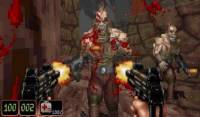
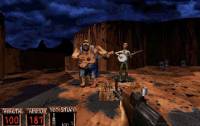
Raze is a fork of Build engine games backed by GZDoom tech and combines Duke Nukem 3D, Blood, Redneck Rampage, Shadow Warrior and Exhumed/Powerslave in a single package. It is also capable of playing Nam and WW2 GI.
“Another day another corpse.” Caleb from Blood.
This system scrapes metadata for the “ports” group(s) and loads the raze set from the currently selected theme, if available.
Grouped with the “ports” group of systems.
Quick reference
- Emulator: Raze
- Folder:
roms/raze/ - Accepted ROM formats:
.raze
BIOS
No Raze emulator in Batocera needs a BIOS file to run.
ROMs
Place your Raze ROMs in /userdata/roms/raze/.
Each game needs a .raze file to tell Raze how to launch the game, the file need to point to the main game file and add-on file.
eg.:
/userdata/roms/raze/Blood - Cryptic Passage.raze (make it easy to scrapper)
/userdata/roms/raze/blood/BLOOD.RFF (main game data)
/userdata/roms/raze/shadow/cryptic.zip (add-on data)
/userdate/roms/raze/shadow/music/blood02.ogg to blood09.ogg (music data - expects to find it in the same directory as the game's main files or in a /music/ sub-folder of it - mudic files named track02.ogg, track03.ogg, etc are supported but are deprecated, prefer to use the game name instead)
- Music files:
- Blood: blood02.ogg to blood09.ogg
- Exhumed: exhumed02.ogg to exhumed19.ogg
- Redneck Rampage/Route 66: redneck02.ogg to redneck09.ogg
- Redneck Rampage: Rides Again: rednecksides02.ogg to redneckrides09.ogg
- Shadow Warrior: shadow02.ogg to shadow14.ogg
- Supported games (.raze file content and data files location):
- One Unit Whole Blood (via NBlood)
/userdata/roms/raze/One Unit Whole Blood.raze
                                            └── FILE = /blood/BLOOD.RFF
/userdata/roms/raze/blood/   [Files from game folder /Blood]
                         ├── BLOOD.INI
                         ├── BLOOD.RFF
                         ├── GUI.RFF
                         ├── SOUNDS.RFF
                         ├── SURFACE.DAT
                         ├── TILES000.ART to TILES017.ART
                         ├── VOXEL.DATBLOOD.RFF
                         ├── GUI.RFF
                         ├── SOUNDS.RFF
                         ├── SURFACE.DAT
                         ├── TILES000.ART to TILES017.ART
                         └── VOXEL.DAT
/userdata/roms/raze/blood/music/   [Files from game folder /Blood]
                               └── blood2.ogg to blood9.ogg (or track02.ogg to track09.ogg) (optional)
- Blood: Death Wish
movies dir, deathwish.ini, dw*.map) to deathwish.zip
/userdata/roms/raze/Blood - Death Wish.RAZE
                                          └── FILE  = /blood/BLOOD.RFF
                                              FILE+ = /blood/deathwish.zip
/userdata/roms/raze/blood/deathwish.zip   [Files from game folder /Death Wish and /Blood]
                                    ├── DEATHWISH.INI (Rename it from DW.INI)
                                    ├── CPART07.AR_
                                    ├── DW1A.OGV to DW3B.OGV
                                    ├── DW1A.SMK to DW3B.SMK
                                    └── DW*.MAP (39 files)
                                              ├── DWBB2.MAP to DWBB3.MAP
                                              ├── DWE1M1.MAP to DWE1M12.MAP
                                              ├── DWE2M1.MAP to DWE2M12.MAP
                                              └── DWE3M1.MAP to DWE3M12.MAP
** - Duke Nukem 3D v1.3D, Atomic Edition, and Twentieth Anniversary World Tour** (via JFDuke & EDuke 2.0; World Tour extensions via DukeGDX)
/userdata/roms/raze/Duke Nukem 3D.raze
                                     └── FILE = /duke/DUKE.RGP
/userdata/roms/raze/duke/   [Files from game folder /Duke Nukem 3D]
                        └── DUKE3D.GRP (The World Tour's extra features will requires the whole game installation)
- Duke It Out in D.C.
/userdata/roms/raze/Duke It Out in D.C..raze
                                           └── FILE  = /duke/DUKE.RGP
                                               FILE+ = /duke/DUKEDC.GRP
/userdata/roms/raze/duke/   [Files from game folder /Duke Nukem 3D and /Duke Nukem 3D/gameroot/addons]
                        ├── DUKE3D.GRP
                        └── DUKEDC.GRP
- Duke Caribbean: Life's a Beach
/userdata/roms/raze/Duke Nukem 3D.raze
                                     └── FILE  = /duke/DUKE.RGP
                                         FILE+ = /duke/VACATION.GRP
/userdata/roms/raze/duke/   [Files from game folder /Duke Nukem 3D and /Duke Nukem 3D/gameroot/addons]
                        ├── DUKE3D.GRP
                        └── VACATION.GRP (Duke Caribbean: Life's a Beach)
- Duke: Nuclear Winter
/userdata/roms/raze/Duke - Nuclear Winter.raze
                                             └── FILE = /duke/DUKE.RGP
                                                 FILE+ = /duke/NWINTER.GRP
/userdata/roms/raze/duke/   [Files from game folder /Duke Nukem 3D and /Duke Nukem 3D/gameroot/addons]
                        ├── DUKE3D.GRP
                        └── NWINTER.GRP
- Duke Zone 2
/userdata/roms/raze/Duke Zone 2.raze
                                   └── FILE = /duke/DUKE!ZON.GRP
                                       FILE+ = /duke/DUKEZONE2.GRPINFO (Atomic) OR DUKEZONE2_WT.GRPINFO (World Tour)
/userdata/roms/raze/dukezone2/   [Files from game folder /Duke Zone 2]
                        ├── DUKE!ZON.GRP
                        ├── DUKEZONE2.GRPINFO (Atomic) OR DUKEZONE2_WT.GRPINFO (World Tour)
                        └── FIXED CON FILES: https://hrp.duke4.net/download.php
                                           ├── GAME.CON
                                           ├── DEFS.CON
                                           ├── USER.CON
                                           └── E3L1.MHK
- Exhumed/PowerSlave (via PCExhumed, with various enhancements inspired by PowerslaveGDX)
/userdata/roms/raze/Exhumed - PowerSlave.raze
                                             └── FILE = /exhumed/STUFF.DAT
/userdata/roms/raze/exhumed/
                           ├── BOOK.MOV
                           └── STUFF.DAT
/userdata/roms/raze/exhumed/music/
                                 └── track02.ogg to track19.ogg (or exhumed02 to exhumed19.ogg) (optional)
- NAM (via EDuke 2.1)
/userdata/roms/raze/Nam.raze
                           └── FILE = /nam/NAM.GRP
                               CON  = /nam/NAM.CON
/userdata/roms/raze/nam/
                       ├── GAME.CON
                       └── NAM.GRP
- Redneck Rampage (via Rednukem)
/userdata/roms/raze/Redneck Rampage.raze
                                       └── FILE = /redneck/REDNECK.GRP
/userdata/roms/raze/redneck/
                           └── REDNECK.GRP
/userdata/roms/raze/redneck/music/
                                 └── track02.ogg to track10.ogg (or redneck02.ogg to redneck10.ogg)
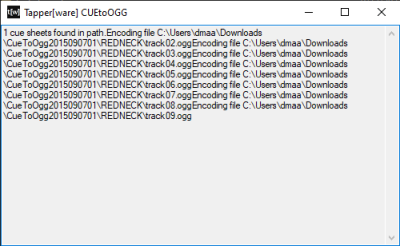
Note: The GOG distribution of the Redneck Rampage Collection does not feature the soundtrack as a loose collection of ogg files. Instead, an Disc Image is provided in the form of a BIN+CUE pair, with the BIN file named REDNECK.gog (or RRRAGAIN.gog) and the CUE file named REDNECK.inst (or RRRAGAIN.inst). The Steam distribution of Redneck Rampage does not feature the CD soundtrack at all, in any form. It is possible to convert the BIN/CUE to .ogg again with https://github.com/hansschmucker/CueToOgg Just copy the .gog and .inst to the CueToOgg root folder and execute CueToOgg.exe, wait until the extract process finish. * Use the same files for Redneck Rampage Rides Again
- Redneck Rampage: Suckin' Grits on Route 66
/userdata/roms/raze/Redneck Rampage - Suckin' Grits on Route 66.raze
                                                                   └── FILE  = /redneck/REDNECK.GRP
                                                                       FILE+ = /redneck/route66.zip
/userdata/roms/raze/redneck/route66.zip (All files ending in 66, extensions .ANM, .ART, .CON, .VOC, and all .MAP files in route66/ folder) [Files from game folder /Redneck Rampage]
                                      ├── ASYAMB.VOC
                                      ├── BUBBA66.CON
                                      ├── DEFS66.CON
                                      ├── END66.ANM
                                      ├── END66.VOC
                                      ├── G_BITE.VOC
                                      ├── G_SIT.VOC
                                      ├── GAME66.CON (Rename to GAME.CON)
                                      ├── GATOR66.CON
                                      ├── NEON.VOC
                                      ├── PIG66.CON
                                      ├── route66/ (all .MAP files) (Keep the ROUTE66 folder into the zip file)
                                      |          ├── ALIEN.MAP
                                      |          ├── BIGFOOT.MAP
                                      |          ├── BREWERY.MAP
                                      |          ├── CAMPY.MAP
                                      |          ├── CARNIVAL.MAP
                                      |          ├── COFFIN.MAP
                                      |          ├── FLEA.MAP
                                      |          ├── GAS.MAP
                                      |          ├── HOOVRDAM.MAP
                                      |          ├── MINIGOLF.MAP
                                      |          ├── RANCH.MAP
                                      |          ├── SLAUGHTR.MAP
                                      |          ├── START.MAP
                                      |          └── TRUCKSTP.MAP
                                      ├── TILESA66.ART (Rename it to TILESA24.ART)
                                      ├── TILEBA66.ART (Rename it to TILESB25.ART)
                                      ├── TURD66.ANM
                                      ├── TURD66.VOC
                                      └── USER66.CON
/userdata/roms/raze/redneck/music/
                                 └── track02.ogg to track10.ogg (or redneck02.ogg to redneck10.ogg) (optional)
- Redneck Rampage Rides Again
/userdata/roms/raze/Redneck Rampage Rides Again.raze
                                                   └── FILE  = /redneckrides/RIDES.GRP
/userdata/roms/raze/redneckrides/   [Files from game folder /Redneck Rampage/AGAIN]
                                ├── RIDES.GRP (Rename it from REDNECK.GRP to RIDES.GRP, this is not the same file as REDNECK/REDNECK.GPR but REDNECK/AGAIN/REDNECK.GPR)
                                └── REDINT.MVE
/userdata/roms/raze/redneckrides/music/
                                      └── track02.ogg to track10.ogg
- Shadow Warrior (via SWP & VoidSW)
/userdata/roms/raze/Shadow Warrior.raze
                                      └── FILE = /shadow/SW.GRP
/userdata/roms/raze/shadow/   [Files from game folder /Shadow Warrior]
                          └── SW.GRP
/userdata/roms/raze/shadow/music/
                                └── track02.ogg to track14.ogg  (or redneckridesk02.ogg to redneckrides10.ogg)
- Shadow Warrior: Twin Dragon
/userdata/roms/raze/Shadow Warrior - Twin Dragon.raze
                                                    ├── FILE  = /shadow/SW.GRP
                                                    └── FILE+ = /shadow/TD.GRP or TWINDRAG.GRP*
/userdata/roms/raze/shadow/      [Files from game folder /Shadow Warrior Classic/ and /Shadow Warrior Classic/gameroot/addons]
                          ├── SW.GRP
                          └── TD.GRP or TWINDRAG.GRP*
/userdata/roms/raze/shadow/music/
                                └── track02.ogg to track14.ogg (or shadow02.ogg to shadow14.ogg) (optional)
- Shadow Warrior: Wanton Destruction
/userdata/roms/raze/Shadow Warrior - Wanton Destruction.raze
                                                           ├── FILE  = /shadow/SW.GRP
                                                           └── FILE+ = /shadow/WT.GRP
/userdata/roms/raze/shadow/   [Files from game folder /Shadow Warrior Classic/ and /Shadow Warrior Classic/gameroot/addons]
                          ├── SW.GRP
                          └── WT.GRP
/userdata/roms/raze/shadow/music/
                                └── track02.ogg to track14.ogg (optional)
- World War II GI (via EDuke 2.1)
/userdata/roms/raze/World War II GI.raze
                                       └── FILE  = /ww2gi/WW2GI.GRP
/userdata/roms/raze/ww2gi/   [Files from game folder /WWII GI]
                         ├── WW2GI.GRP
                         └── WW2GI.CON
- World War II GI: Platoon Leader (expansion)
/userdata/roms/raze/World War II GI - Platoon Leader.raze
                                                        ├── FILE  = /ww2gi/WW2GI.GRP
                                                        ├── FILE+ = /ww2gi/PLATOONL.DAT
                                                        └── CON   = /ww2gi/PLATOONL.DEF
/userdata/roms/raze/ww2gi/   [Files from game folder /WWII GI Platoon Leader]
                         ├── WW2GI.GRP
                         ├── PLATOONL.DAT
                         └── PLATOONL.DEF
Features
Raze includes the following features:
- Polymost is used as the primary render, but significantly rewritten and separated from OpenGL, utilizing a new texture manager. Polymost is only used in this capacity to generate polygons and sending them off to the backend, which runs on OpenGL 3.3 with the option to use OpenGL 4.5 features. This ensures that new render features can be added to the same backend later, and where a different renderer other than Polymost can also be used
- GZDoom's post-processing effects framework is incorporated, allowing effects such as bloom and faking increased color ranges with dithering to be possible
- A replaced and revamped file system, based on the WAD manager used in GZDoom
- Runs on the full GZDoom backend
- Overhauled input system, with synchronized and unsynchronized modes
- Improved interpolation, both engine-side and game-side
- Skies are rendered as a composite texture, curing the visible seams in many sky textures
- A lighter version of GZDoom's “ZMusic” library is used as music system
- OpenAL is used as sound system
- The menu code from GZDoom is used as a generic system across all supported games
- Support for multiple languages
- Integrated widescreen compatible assets for the supported games
- Games are in their own modules and do not interact with each other. Render, sound system, and input are used universally across the titles
- Controller support is included, using the existing ZDoom controller code
- Multiplayer and networking have a different implementation per game, which are currently entirely nonfunctional and left as-is
- OSD and configuration maintenance replaced with ZDoom's console and config code
Launch Game
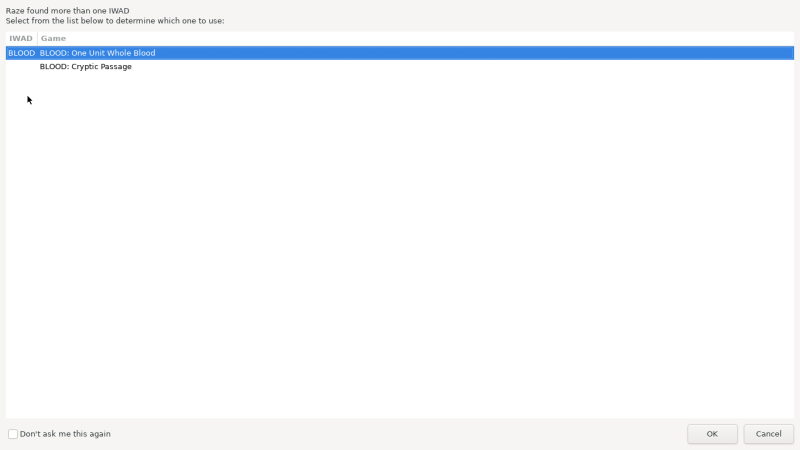
When launching a game, if it has an add-on associated, it will be required to select between the main game or the add-on:
Saves
Save location saves/raze/<game>.<save game extension>
Emulators
Raze

https://batocera.org/raze [is a cool emulator that focuses on X attribute. Common resources for getting info on such emulators are their own websites, wiki, forum, Github pages. You can also scour docs.libretro if it's a libretro core specifically, or that other wiki if it's infamous enough.]
What platforms should this emulator be used on? Are there any special notes or reasons why it's included in Batocera over other emulators?
Emulator A configuration
This would be where all the settings available to this standalone emulator would go.
Standardized features available: system.option_A, system.option_B
ES setting name batocera.conf_key | Description ⇒ ES option key_value |
|---|---|
OPTION NAME AS IT APPEARS IN ES systemshortname.emulator_option | A description of what this setting does. Try to make it as approachable as possible without being more than a paragraph long, if you need longer it might be worth adding it as its own section. ⇒ Option A value_a, Option B value_b, Option C value_c |
Any special notes about configuration should go here, as well as alternative locations for editing the CFG file if applicable (most emulators won't need this).
Controls
Here are the default Raze's controls shown on a Batocera Retropad:
Troubleshooting
For further troubleshooting, refer to the generic support pages.
- systems/raze.1663944029.txt.gz
- Last modified: 4 years ago
- by maioni