This is an old revision of the document!

Sony PlayStation 3
The PlayStation 3 is a home console developed by Sony. It was released in 2006.
PS3 emulation is only available on x86_64 (i.e. not on Raspberry Pi, Odroid or other SBCs).
This system scrapes metadata for the ps3 group and loads the ps3 set from the currently selected theme, if available.
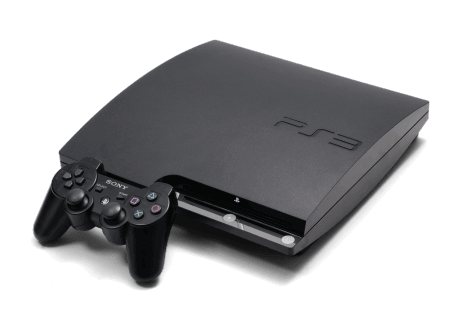
Quick reference
- Emulator: rpcs3
- Folder:
/userdata/roms/ps3 - Accepted ROM formats:
.ps3.psn.squashfs
BIOS
| MD5 checksum | Share file path | Description |
|---|---|---|
a0b63a3e4ae92ed176d6b9a67ce447f0 | bios/PS3UPDAT.PUP | PS3 firmware file |
Sony distributes this firmware on their website for installing onto your PlayStation 3; no link can be provided but it's easy enough to find by using a search engine.
PS3UPDAT.PUP is still updated to this day. The MD5 shown here may be for an older firmware, check the MISSING BIOS tool to check the MD5 for your current installation of Batocera.
ROMs
Add other formats. Cleanup in general.
Place your Sony Playstation 3 ROMs in /userdata/roms/ps3.
PlayStation 3 ROMs can come in many formats, disc-based, PSN and that other one. They're all stored as multiple files inside of an over-arching folder.
Disc-based games
Batocera accepts these kinds of PS3 games in the following folder structure:
ps3/
└─ Game name.ps3/
   ├─ PS3_GAME/
   │  ├─ LICDIR/
   │  ├─ TROPDIR/ (trophy data)
   │  ├─ USRDIR/ (the main game data)
   │  ├─ ICON0.PNG
   │  ├─ PARAM.SFO
   │  ├─ PIC0.PNG
   │  ├─ PS3LOGO.DAT
   │  └─ (various other metadata files)
   ├─ PS3_UPDATE/ (built-in firmware update, if applicable)
   └─ PS3_DISC.SFB
Emulators
RPCS3
RPCS3 configuration
Standardized features available to all cores of this emulator: ps3.videomode
ES setting name batocera.conf key | Description » ES option key value |
|---|---|
GRAPHICAL USER INTERFACE ps3.gui | Display the user interface » Off 0, On 1. |
GRAPHICS BACKEND ps3.gfxbackend | Choose your graphics rendering » OpenGL OpenGL, Vulkan Vulkan. |
SPU DECODER ps3.spudecoder | LLVM used by default. Use ASMJIT if game crashes; then Interpreter (fast) if still crashing. ⇒ Recompiler (LLVM) Recompiler (LLVM), Recompiler (ASMJIT) Recompiler (ASMJIT), Interpreter (fast) Interpreter (fast), Interpreter (precise) Interpreter (precise). |
First RPCS3 run
The emulator we use is RPCS3, the PS3 opensource emulator. It requires more resources than older systems, in particular you need a decent CPU with a Vulkan-compatible GPU for hardware acceleration. Games won't run correctly if you don't have GPU acceleration, please refer to RPCS3 hardware recommendations on their website.
When RPCS3 is run for the first time, it will ask to install the provided firmware from the BIOS folder (userdata/bios/PS3UPDAT.PUP). Do so. This may take a while, grab a cup of tea while you wait. When it's done, simply exit the program (File → Exit or [Ctrl] + [Q]) and launch a game again. This will need to be done for every new firmware released. This action can also be invoked manually by going to File → Install firmware.
Run disc games
Once you have correctly installed the firmware in the previous step, you can quit the File browser ([Ctrl]+[Q]) and go in the PS3 system menu from EmulationStation.
PlayStation 3 games are installed as .ps3 directories.
On the first run of each game, RPCS3 will be compiling PPU modules again.
Run PSN games
- Install the game from pkg files in
rpcs3-config - Create a text file in
roms/ps3/with a.psnextension. The contents of the file is the game's ID - for example, Scott Pilgrim vs. the World (which won't get out of demo mode unless it's running from the proper folder) would contain NPUB30162 in the PSN file.
- Scott Pilgrim vs. the World.psn
NPUB30162
And that's it. I added an extra line to the English version of the PS3's system text to explain it.
Folder compression
From Batocera v33 and higher, you can losslessly compress PS3 game folders as SquashFS images and still have RPCS3 read them as if though they weren't compressed at all!
To do so, open up SSH and run the following commands on your already installed games:
cd /userdata/roms/ps3
mksquashfs "<game name>.<folder extension>" "<game name>.<folder extension>.squashfs"
For example:
cd /userdata/roms/ps3
mksquashfs "little big planet.ps3" "little big planet.ps3.squashfs"
It is important that you maintain the folder extension for ps3 and psn extensions respectively.
Game compatibility
You can check the latest PS3 game compatibility from the official list on RPCS3 website.
Controls
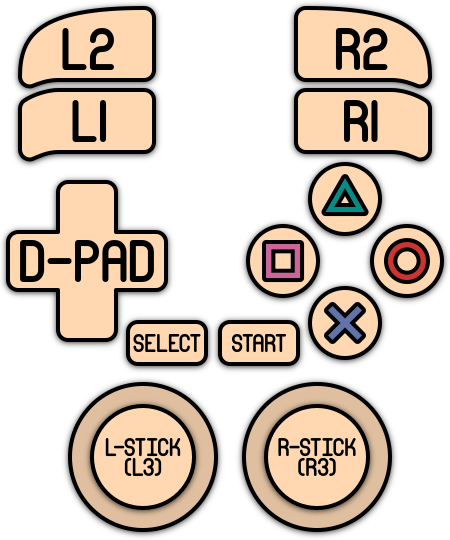
Here are the Sony PlayStation 3's controls shown on a Batocera Retropad:
Troubleshooting
For further troubleshooting, refer to the generic support pages.
- systems/ps3.1643003153.txt.gz
- Last modified: 5 years ago
- by atari