This is an old revision of the document!

NEO•GEO CD
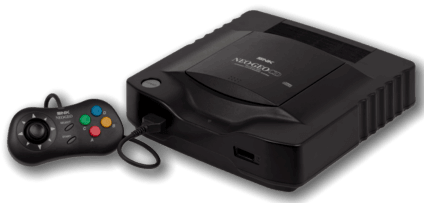
The NEO•GEO CD is a home console developed by SNK, designed to allow gamers to play their favorite arcade games from the comfort of their own home. It was released in 1994 and retailed for $399 USD. Its internals are similar to the cartridge-based NEO•GEO AES, though the CD has a lot more RAM.
This system scrapes metadata for the “neogeocd” group and loads the neogeocd set from the currently selected theme, if available.
Quick reference
- Emulator: RetroArch
- Cores available: libretro: neocd, libretro: fbneo
- Folder:
/userdata/roms/neogeocd - Accepted ROM formats:
.cue,.iso,.chd
BIOS
To function NeoCD need a BIOS from a Front Loading, Top Loading or CDZ machine. The BIOS files should be installed in the /userdata/bios/neocd folder. You need at least one in the following table. If several BIOSes are available, it will be possible to choose which to run in the EmulationStation System Configuration Menu.
The hashes are given to help you verify the files have not been tampered with, the emulator doesn't verify them.
| Description | Share file path | SHA1 |
|---|---|---|
| CDZ BIOS | bios/neocd/neocd_z.rom | b0f1c4fa8d4492a04431805f6537138b842b549f |
| CDZ BIOS (MAME) | bios/neocd/neocd.bin | 7bb26d1e5d1e930515219cb18bcde5b7b23e2eda |
| Universe BIOS CD 3.3 | bios/neocd/uni-bioscd.rom | 5142f205912869b673a71480c5828b1eaed782a8 |
ROMs
Place your Neo-Geo CD ROMs in /userdata/roms/neogeocd.
It's usually fine to use the latest MAME romset for this.
Emulators
RetroArch
RetroArch (formerly SSNES), is a ubiquitous frontend that can run multiple “cores”, which are essentially the emulators themselves. The most common cores use the libretro API, so that's why cores run in RetroArch in Batocera are referred to as “libretro: (core name)”. RetroArch aims to unify the feature set of all libretro cores and offer a universal, familiar interface independent of platform.
RetroArch configuration
RetroArch offers a Quick Menu accessed by pressing [HOTKEY] +  which can be used to alter various things like RetroArch and core options, and controller mapping. Most RetroArch related settings can be altered from Batocera's EmulationStation.
Standardized features available to all libretro cores: neogeocd.videomode, neogeocd.ratio, neogeocd.smooth, neogeocd.shaders, neogeocd.pixel_perfect, neogeocd.decoration, neogeocd.game_translation
ES setting name batocera.conf_key | Description ⇒ ES option key_value |
|---|---|
| Settings that apply to all cores of this emulator | |
GRAPHICS BACKEND neogeocd.gfxbackend | Choose your graphics rendering ⇒ OpenGL opengl, Vulkan vulkan. |
AUDIO LATENCY neogeocd.audio_latency | Audio latency in milliseconds, turn it up if you hear crackles ⇒ 256 256, 192 192, 128 128, 64 64, 32 32, 16 16, 8 8. |
THREADED VIDEO neogeocd.video_threaded | Improves performance at the cost of latency and more video stuttering. Use only if full speed cannot be obtained otherwise. ⇒ On true, Off false. |
libretro: neocd
Libretro NeoCD is a contemporary NEO•GEO CD emulator. To quote its readme:
NeoCD-Libretro is a complete rewrite of NeoCD from scratch in modern C++11. It is designed with accuracy and portability in mind rather than being all about speed like the the older versions.
libretro: neocd configuration
ES setting name batocera.conf_key | Description ⇒ ES option key_value |
|---|---|
| Settings that apply to all systems this core supports | |
CONSOLE REGION global.neocd_region | Change language of some games ⇒ Japan Japan, USA USA, Europe Europe. |
BIOS SELECT global.neocd_bios | CD Universe Bios not include cheats ⇒ CDZ CDZ, CDZ (MAME) CDZ (MAME), Universe 3.2 Universe 3.2. |
PER-GAME SAVES global.neocd_per_content_saves | Use one save file per-game ⇒ Off False, On True. |
libretro: fbneo
FBNeo can run a lot of things, can't it? Description needed.
libretro: fbneo configuration
ES setting name batocera.conf_key | Description ⇒ ES option key_value |
|---|---|
| Settings that apply to all systems this core supports | |
CPU CLOCK global.fbneo-cpu-speed-adjust | Can fix native system slowdowns in some games ⇒ 30% 30%, 40% 40%, 50% 50%, 60% 60%, 70% 70%, 80% 80%, 90% 90%, 100% 100%, 110% 110%, 120% 120%, 130% 130%, 140% 140%, 150% 150%, 160% 160%, 170% 170%, 180% 180%, 190% 190%, 200% 200%. |
FRAMESKIP global.fbneo-frameskip | Skip frames to improve performance (smoothness) ⇒ No skipping 0, Skip rendering of 1 frames out of 2 1, Skip rendering of 2 frames out of 3 2, Skip rendering of 3 frames out of 4 3, Skip rendering of 4 frames out of 5 4. |
CROSSHAIR (LIGHTGUN) global.fbneo-lightgun-hide-crosshair | Show crosshair if playing with a lightgun device ⇒ Off enabled, On disabled. |
| Settings specific to neogeo | |
NEOGEO MODE neogeo.fbneo-neogeo-mode-switch | Load appropriate Bios depending on your choice ⇒ Console AES World AES Asia, Console AES Japan AES Japan, Arcade MVS Europe MVS Asia/Europe, Arcade MVS USA MVS USA, Arcade MVS Japan MVS Japan, Arcade Universe BIOS (Cheats) Universe BIOS. |
MEMORY CARD MODE neogeo.fbneo-memcard-mode | Change the behavior for the memory card ⇒ Off disabled, Shared shared, Per-game per-game. |
Controls
The controller for the NEO•GEO CD had an interesting “D-pad” which was a small disc floating above a circular perimeter, with micro-switch activation allowing for precise control of inputs; a necessity for the fighting games featured on the console. It's truly something that needs to be physically felt to be understood.
Here are the default NEO•GEO CD's controls shown on a Batocera Retropad:

Troubleshooting
Further troubleshooting
For further troubleshooting, refer to the generic support pages.
- systems/neogeocd.1653298202.txt.gz
- Last modified: 4 years ago
- by modhack