This is an old revision of the document!

NEO•GEO
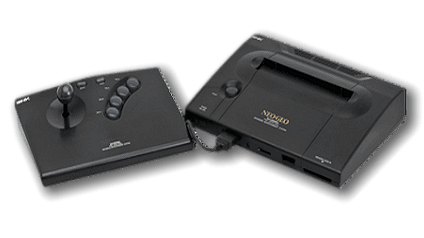
The NEO•GEO AES (Advanced Entertainment System) is a home console developed by SNK. It was released in 1991 and retailed for the high price of $649.99 USD. It was based on the NEO•GEO arcade hardware released a year prior. This hardware would be upgraded a few years later in the form of the NEO•GEO CD, with its ability to read disc-based media and being a lot cheaper.
NEO•GEO AES games are emulated much the same way that regular arcade games are, so the regular arcade emulators are used. It's recommended to read up on the generic arcade guide first as it will answer many questions.
This system scrapes metadata for the “neogeo” and “arcade” groups and loads the neogeo set from the currently selected theme, if available.
Quick reference
- Accepted ROM formats:
.7z,.zip - Folder:
/userdata/roms/neogeo
BIOS
| MD5 checksum | Share file path | Description |
|---|---|---|
dffb72f116d36d025068b23970a4f6df | bios/neogeo.zip | Neo Geo BIOS |
ROMs
Place your NEO•GEO ROMs in /userdata/roms/neogeo.
They'll also work equally as well if placed into /userdata/roms/mame, however by placing them specifically in neogeo they'll get their own little system list.
Each romset is specific to the version of MAME/FBNeo being used:
- FBNeo 1.0.0.0 romset for libretro: FBNeo
- 0.37b5 romset for the libretro: imame4all version
- 078plus romset for the libretro: mame078plus version
- 0.139 romset for the libretro: mame0139 version
- Latest romset at the release of stable for the libretro: mame/mame versions
Emulators
RetroArch
RetroArch (formerly SSNES), is a ubiquitous frontend that can run multiple “cores”, which are essentially the emulators themselves. The most common cores use the libretro API, so that's why cores run in RetroArch in Batocera are referred to as “libretro: (core name)”. RetroArch aims to unify the feature set of all libretro cores and offer a universal, familiar interface independent of platform.
RetroArch configuration
RetroArch offers a Quick Menu accessed by pressing [HOTKEY] +  which can be used to alter various things like RetroArch and core options, and controller mapping. Most RetroArch related settings can be altered from Batocera's EmulationStation.
Standardized features available to all libretro cores: neogeo.videomode, neogeo.ratio, neogeo.smooth, neogeo.shaders, neogeo.pixel_perfect, neogeo.decoration, neogeo.game_translation
ES setting name batocera.conf_key | Description ⇒ ES option key_value |
|---|---|
| Settings that apply to all cores of this emulator | |
GRAPHICS BACKEND neogeo.gfxbackend | Choose your graphics rendering ⇒ OpenGL opengl, Vulkan vulkan. |
AUDIO LATENCY neogeo.audio_latency | Audio latency in milliseconds, turn it up if you hear crackles ⇒ 256 256, 192 192, 128 128, 64 64, 32 32, 16 16, 8 8. |
THREADED VIDEO neogeo.video_threaded | Improves performance at the cost of latency and more video stuttering. Use only if full speed cannot be obtained otherwise. ⇒ On true, Off false. |
libretro: FBAlpha
a.k.a. fbalpha2012, this is an older build of FinalBurn Alpha that performs better on weaker SBCs like the RPi Zero.
Todo for this emulator: like everything.
libretro: FBNeo
A libretro port of FinalBurn Neo is a specialized multi-arcade emulator forked from Final Burn Alpha after… stuff happened. This is the most current version of FBNeo available in Batocera.
libretro: FBNeo configuration
ES setting name batocera.conf_key | Description ⇒ ES option key_value |
|---|---|
| Settings that apply to all systems this core supports | |
CPU CLOCK global.fbneo-cpu-speed-adjust | Can fix native system slowdowns in some games ⇒ 30% 30%, 40% 40%, 50% 50%, 60% 60%, 70% 70%, 80% 80%, 90% 90%, 100% 100%, 110% 110%, 120% 120%, 130% 130%, 140% 140%, 150% 150%, 160% 160%, 170% 170%, 180% 180%, 190% 190%, 200% 200%. |
FRAMESKIP global.fbneo-frameskip | Skip frames to improve performance (smoothness) ⇒ No skipping 0, Skip rendering of 1 frames out of 2 1, Skip rendering of 2 frames out of 3 2, Skip rendering of 3 frames out of 4 3, Skip rendering of 4 frames out of 5 4. |
CROSSHAIR (LIGHTGUN) global.fbneo-lightgun-hide-crosshair | Show crosshair if playing with a lightgun device ⇒ Off enabled, On disabled. |
| Settings specific to neogeo | |
NEOGEO MODE neogeo.fbneo-neogeo-mode-switch | Load appropriate Bios depending on your choice ⇒ Console AES World AES Asia, Console AES Japan AES Japan, Arcade MVS Europe MVS Asia/Europe, Arcade MVS USA MVS USA, Arcade MVS Japan MVS Japan, Arcade Universe BIOS (Cheats) Universe BIOS. |
MEMORY CARD MODE neogeo.fbneo-memcard-mode | Change the behavior for the memory card ⇒ Off disabled, Shared shared, Per-game per-game. |
libretro: imame4all
libretro: imame4all configuration
libretro: mame078plus
libretro: mame078plus configuration
ES setting name batocera.conf_key | Description ⇒ ES option key_value |
|---|---|
| Settings that apply to all systems this core supports | |
CONTROL MAPPING global.mame2003-plus_analog | Choose from Analog or Digital controller ⇒ Analog analog, Digital digital. |
FRAMESKIP global.mame2003-plus_frameskip | Skip frames to improve performance (smoothness) ⇒ Off 0, 1 1, 2 2, 3 3, 4 4, 5 5. |
INPUT INTERFACE global.mame2003-plus_input_interface | Use input directly sends by keyboard to the core ⇒ Retropad retropad, Keyboard keyboard, Simultaneous simultaneous. |
TATE MODE global.mame2003-plus_tate_mode | Rotating display to vertical mode rendering ⇒ Off disabled, On enabled. |
NEOGEO MODE global.mame2003-plus_neogeo_bios | Manually specify your choice of Neo Geo BIOS ⇒ Console AES World asia-aes, Arcade MVS Europe euro, Arcade MVS USA us, Arcade MVS Japan japan, Arcade Universe BIOS 4.0 (Cheats) unibios40, Arcade Universe BIOS 3.3 (Cheats) unibios33. |
libretro: mame0139
libretro: mame
libretro: mame configuration
ES setting name batocera.conf_key | Description ⇒ ES option key_value |
|---|---|
| Settings that apply to all systems this core supports | |
CPU OVERCLOCK global.mame_cpu_overclock | Minimize in-game slowdowns of some games ⇒ default default, 30 30, 35 35, 40 40, 45 45, 50 50, 55 55, 60 60, 65 65, 70 70, 75 75, 80 80, 85 85, 90 90, 95 95, 100 100, 105 105, 110 110, 115 115, 120 120, 125 125, 130 130, 135 135, 140 140, 145 145, 150 150. |
VIDEO RESOLUTION global.mame_altres | Increase the video resolution ⇒ 640×480 640×480, 800×600 800×600, 960×720 960×720, 1024×768 1024×768, 1280×720 1280×720, 1600×800 1600×800, 1920×1080 1920×1080, 2560×1440 2560×1440, 3840×2160 3840×2160. |
MAME
MAME, the Multiple Arcade Machine Emulator, is a multi-purpose emulation framework which facilitates the emulation of vintage hardware and software. Originally targeting vintage arcade machines, MAME has since absorbed the sister-project MESS (Multi Emulator Super System) to support a wide variety of vintage computers, video game consoles and calculators as well. MAME doesn't use an individual “core” for each system like RetroArch does, instead the ROM itself usually contains the necessary information to accurately emulate it, thus making it specific to the version of MAME it was made for. Overall it's a very complicated subject, we have a guide specific to arcade just for it.
MAME configuration
MAME offers a Menu in-game (L3 + R3 or [HOTKEY] + ). This can be used to manually adjust inputs or game settings. If you're having issues with a specific game, check the MAMEdev FAQ for that game here. For MESS systems specifically, you might find more information on MESS's wiki. All options can also be edited by opening the mame.ini file.
Standardized features available to all versions of this emulator: neogeo.videomode, neogeo.decoration, neogeo.padtokeyboard
ES setting name batocera.conf_key | Description ⇒ ES option key_value |
|---|---|
| Settings that apply to all versions of this emulator | |
GRAPHICS BACKEND neogeo.video | Choose your graphics rendering ⇒ BGFX bgfx, Accel accel, OpenGL opengl. |
BGFX BACKEND neogeo.bgfxbackend | Choose your graphics API ⇒ MAME Detect automatic, OpenGL opengl, OpenGL ES gles, Vulkan vulkan. |
BGFX VIDEO FILTER neogeo.bgfxshaders | Apply a particular visual effect ⇒ Off None, Bilinear default, CRT Geom crt-geom, CRT Geom Deluxe crt-geom-deluxe, Super Eagle eagle, HLSL hlsl, HQ2X hq2x, HQ3X hq3x, HQ4X hq4x. |
CRT SWITCHRES neogeo.switchres | CRT monitor SwitchRes support ⇒ Off 0, On 1. |
TATE MODE neogeo.rotation | Rotating display to vertical mode rendering ⇒ Off None, Rotate 90 autoror, Rotate 270 autorol. |
ALT DPAD MODE neogeo.altdpad | If the D-Pad does not work properly ⇒ Off (Default) 0, DS3 Orientation 1, X360 Orientation 2. |
fba2x
A standalone version of Final Burn Alpha, this is a specialized fork of an older build of FBAlpha that performs better on weaker SBCs like the RPi Zero.
Todo for this emulator: like everything.
Controls
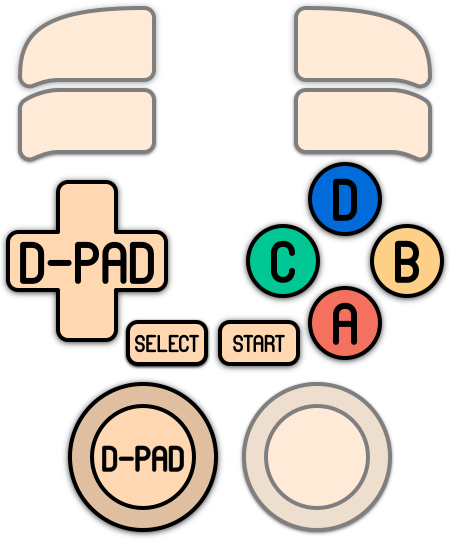
Here are the default NEO•GEO's controls shown on a Batocera Retropad:
Troubleshooting
Further troubleshooting
Most questions are answered in the generic arcade guide.
For further troubleshooting, refer to the generic support pages.
- systems/neogeo.1656553066.txt.gz
- Last modified: 4 years ago
- by maioni