This is an old revision of the document!
This article needs some TLC. Read at your own risk.

VTech Laser 310
The VTech Laser 310 is a home computer developed by Video Technology. It was released in 1984. A version of this system was also released as the Dick Smith Electronics VZ-300. Here's a cool article about it on oldcomputers.net.
This system scrapes metadata for the “laser310” group and loads the laser310 set from the currently selected theme, if available.

Quick reference
- Emulator: MAME
- Folder:
/userdata/roms/laser310 - Accepted ROM formats:
.vz.wav.cas.zip.7z - BIOS files:
laser310.zip - BIOS required? yes
- Configuration via: EmulationStation
| Emulators | Folder | Accepted ROM formats | BIOS files | BIOS required? | Configuration via |
|---|---|---|---|---|---|
| MAME | roms/laser310/ | .vz .wav .cas .zip .7z | laser310.zip | Yes | EmulationStation |
| LibRetro: MAME | roms/laser310/ | .vz .wav .cas .zip .7z | laser310.zip | Yes | EmulationStation and emu-config |
BIOS
The BIOS files aren't strictly required for emulation, but can dramatically improve compatibility and accuracy. For best results, place laser310.zip in the bios/ folder, with the following contents:
| MD5 checksum | Filename | Description |
|---|---|---|
42c8f9e6c2133ae0e953b89ccbbdb7e2 | vtechv20.u12 | BASIC V2.0 |
f7e5d9a3eb2b57bf5f4e2a4565318a8f | vtechv21.u12 | BASIC V2.1 (hack) |
ROMs
Place your VTech Laser 310 ROMs in /userdata/roms/laser310/.
Emulators
MAME
MAME, the Multiple Arcade Machine Emulator, is a multi-purpose emulation framework which facilitates the emulation of vintage hardware and software. Originally targeting vintage arcade machines, MAME has since absorbed the sister-project MESS (Multi Emulator Super System) to support a wide variety of vintage computers, video game consoles and calculators as well. MAME doesn't use an individual “core” for each system like RetroArch does, instead the ROM itself usually contains the necessary information to accurately emulate it, thus making it specific to the version of MAME it was made for. Overall it's a very complicated subject, we have a guide specific to arcade just for it.
MAME configuration
MAME offers a Menu in-game ([HOTKEY] +  or
or [Tab] on the keyboard). This can be used to manually adjust inputs or game settings. If you're having issues with a specific game, check the MAMEdev FAQ for that game here. For MESS systems specifically, you might find more information on MESS's wiki. All options can also be edited by opening the mame.ini file.
Standardized features available to all versions of this emulator: laser310.videomode, laser310.decoration, laser310.padtokeyboard
ES setting name batocera.conf_key | Description ⇒ ES option key_value |
|---|---|
| Settings that apply to all versions of this emulator | |
VIDEO MODE laser310.video | BGFX for post-processing, accel/opengl for raw image. ⇒ BGFX bgfx, Accel accel, OpenGL opengl. |
BGFX GRAPHICS API laser310.bgfxbackend | Depends on video mode being set to BGFX. Vulkan is better, when supported. ⇒ MAME Detect automatic, OpenGL opengl, OpenGL ES gles, Vulkan vulkan. |
BGFX VIDEO FILTER laser310.bgfxshaders | Apply a post-processing effect. ⇒ Off None, Bilinear default, CRT Geom crt-geom, CRT Geom Deluxe crt-geom-deluxe, Super Eagle eagle, HLSL hlsl, HQ2X hq2x, HQ3X hq3x, HQ4X hq4x. |
CRT SWITCHRES laser310.switchres | Allows the use of switchres profiles if present. ⇒ Off 0, On 1. |
VERTICAL ROTATION (TATE) laser310.rotation | Rotates screen by 90 degrees. Intended for rotating displays. ⇒ Off None, Rotate 90 autoror, Rotate 270 autorol. |
ALT DPAD MODE laser310.altdpad | If the D-Pad is oriented incorrectly for your controller. ⇒ Off (Default) 0, DS3 Orientation 1, X360 Orientation 2. |
SPECIAL CONTROL LAYOUTS laser310.altlayout | Controls for 5/6 button games and other unique controls ⇒ Default Only 0, Street Fighter (SNES) 1, Street Fighter (Modern) 4, Mortal Kombat (SNES) 2, Killer Instinct (SNES) 3, Genesis 6-Button (Retroarch) 5, Neo Geo (Neo Geo Mini Pad) 6, Neo Geo (Neo Geo CD Pad) 7, Neo Geo (Offset Fightstick) 8, Twin Stick with Triggers 9, Rotated 4-Way Stick (Q*Bert) 10. |
Settings specific to laser310 |
|
MEDIA TYPE laser310.altromtype | Type of ROM file to load. ⇒ Cassette cass, Snapshot snap. |
UI KEYS laser310.enableui | Open with hotkey + D-pad up or Scroll Lock in-game. ⇒ Off at Start 0, On at Start 1. |
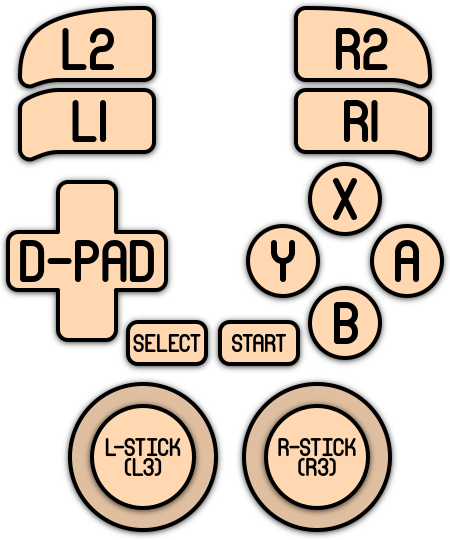
Controls
The default button mapping for the laser310's controls is as follows::
Troubleshooting
For problems with MAME specifically, there are some tips on the troubleshooting section on MAME's system page.
For further troubleshooting, refer to the generic support pages.
- systems/laser310.1677020114.txt.gz
- Last modified: 4 years ago
- by maximumentropy