This is an old revision of the document!
This article needs some TLC. Read at your own risk.


Fujitsu FM-TOWNS
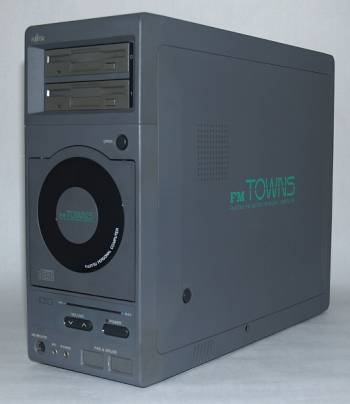
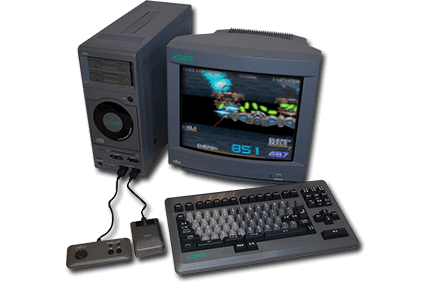
The Fujitsu FM-TOWNS is a series of computers developed by Fujitsu between 1989 and 1997. It was exclusively released in Japan.
FM stands for “Fujistu Micro”, while the “Towns” was derived from the system's codename “Townes” (referring to Charles Townes, one of the winners of the 1964 Nobel Prize in Physics) used during development. The “e” was dropped to emphasis its pronounciation like “towns” rather than “tow-nes”.
The system was known for being technologically superior to its competitors at the time, the NEC PC-98 and even some 4th generation videogame consoles, however it struggled to gain the same foothold as the PC-98 did. The ports of arcade games released for the FM-7 were usually the definitive version to have at the time, outside of playing the game on the original arcade hardware itself, making them highly sought after.
In 1993, the FM Towns Marty was released, which is a game console compatible with the existing FM Towns games.
Eventually, DOS/V support would be added to the computer system, allowing for the booting of other operating systems such as Microsoft's Windows. Over time, Fujitsu would shift its development focus from software coded specifically for the FM Towns and instead making more universally compatible DOS code.
Emulation of this system is still somewhat experimental and only recommended to advanced users, those who might already be familiar with assigned drive letters manually and working the FM Town's Japanese interface.
This system scrapes metadata for the “fmtowns” group and loads the fmtowns set from the currently selected theme, if available.
Quick reference
- Emulator: tsugaru
- Folder:
/userdata/roms/fmtowns - Accepted ROM formats:
.bin,.m3u,.cue,.d88,.d77,.xdf,.iso
BIOS
| MD5 checksum | Share file path | Description |
|---|---|---|
8fa4e553f28cfc0c30a0a1e589799942 | bios/fmtowns/FMT_DIC.ROM | |
0585b19930d4a7f4c71bcc8a33746588 | bios/fmtowns/FMT_DOS.ROM | |
ac0c7021e9bf48ca84b51ab651169a88 | bios/fmtowns/FMT_F20.ROM | |
b91300e55b70227ce98b59c5f02fa8dd | bios/fmtowns/FMT_FNT.ROM | |
86fb6f7280689259f0ca839dd3dd6cde | bios/fmtowns/FMT_SYS.ROM |
In case you don't have BIOS files, a free (albeit less compatible) set can be found at their website as well.
ROMs
Place your Fujitsu FM-TOWNS ROMs in /userdata/roms/fmtowns.
Emulators
Tsugaru
Tsugaru is a relatively new FM Towns emulation project (started in January of 2020) with a high level of compatibility. System requires are particularly demanding and certain components (notably sound chips) are still experimental.
Check out the compatibility list at the bottom of their website.
Tsugaru configuration
Standardized features available to all cores of this emulator: fmtowns.videomode, fmtowns.pad2keyboard, fmtowns.decoration
ES setting name batocera.conf_key | Description ⇒ ES option key_value |
|---|---|
| Settings that apply to all cores of this emulator | |
CD-ROM SPEED fmtowns.cdrom_speed | ⇒ AUTO (DEFAULT) auto, 1X 1, 2X 2, 4X 4, 8X 8. |
FORCE 386DX CPU fmtowns.386dx | Required by some games. ⇒ NO (DEFAULT) 0, YES 1. |
Controls
Here are the default Fujitsu FM-TOWNS's controls shown on a Batocera RetroPad:

Troubleshooting
Further troubleshooting
For further troubleshooting, refer to the generic support pages.
- systems/fmtowns.1640052289.txt.gz
- Last modified: 5 years ago
- by atari