This is an old revision of the document!
This article needs some TLC. Read at your own risk.

Amiga CDTV
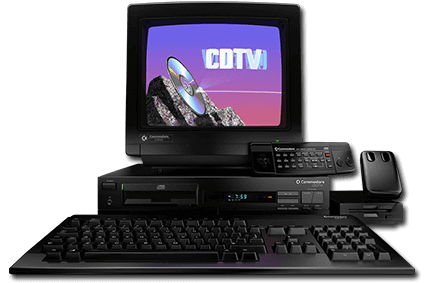
The CDTV is a home entertainment console developed by Commodore. It was released in 1991.
Essentially, it is an Amiga 500 computer with a CD-ROM drive and remote control. Attaching a keyboard, mouse and floppy disk drive would make it have the same functionality as the Amiga 500. The system was marketed as “CDTV”, without the “Amiga” branding at the front.
This system scrapes metadata for the “amigacdtv” group(s) and loads the amigacdtv set from the currently selected theme, if available.
Quick reference
- Accepted ROM formats:
.bin,.cue,.iso,.chd,.m3u - Folder:
/userdata/roms/amigacdtv
| Emulators |
|---|
| fsuae: CDTV |
| libretro: puae |
BIOS
No Amiga CDTV emulator in Batocera needs a BIOS file to run.
ROMs
Place your Amiga CDTV ROMs in /userdata/roms/amigacdtv.
Emulators
fsuae
fsuae configuration
Standardized features available to all cores of this emulator: amigacdtv.videomode, amigacdtv.ratio, amigacdtv.padtokeyboard, amigacdtv.decoration
RetroArch
RetroArch (formerly SSNES), is a ubiquitous frontend that can run multiple “cores”, which are essentially the emulators themselves. The most common cores use the libretro API, so that's why cores run in RetroArch in Batocera are referred to as “libretro: (core name)”. RetroArch aims to unify the feature set of all libretro cores and offer a universal, familiar interface independent of platform.
RetroArch configuration
RetroArch offers a Quick Menu accessed by pressing [HOTKEY] +  which can be used to alter various things like RetroArch and core options, and controller mapping. Most RetroArch related settings can be altered from Batocera's EmulationStation.
Standardized features available to all libretro cores: amigacdtv.videomode, amigacdtv.ratio, amigacdtv.smooth, amigacdtv.shaders, amigacdtv.pixel_perfect, amigacdtv.decoration, amigacdtv.game_translation
ES setting name batocera.conf_key | Description ⇒ ES option key_value |
|---|---|
| Settings that apply to all cores of this emulator | |
GRAPHICS API amigacdtv.gfxbackend | Choose which graphics API library to use. Vulkan is better, when supported. ⇒ OpenGL opengl, Vulkan vulkan. |
AUDIO LATENCY amigacdtv.audio_latency | In milliseconds. Can reduce crackling/cutting out. ⇒ 256 256, 192 192, 128 128, 64 64, 32 32, 16 16, 8 8. |
THREADED VIDEO amigacdtv.video_threaded | Improves performance at the cost of latency and more video stuttering. ⇒ On true, Off false. |
libretro: puae
libretro: puae configuration
ES setting name batocera.conf_key | Description ⇒ ES option key_value |
|---|---|
| Settings that apply to all systems this core supports | |
AMIGA MODEL global.puae_model | Force a specific model and prevent tags detection. ⇒ Autodetect (by game name tag) automatic, A500 (512KB Chip + 512KB Slow) A500, A500+ (1MB Chip) A500PLUS, A600 (2MB Chip + 8MB Fast) A600, A1200 (2MB Chip + 8MB Fast) A1200, A4000/040 (2MB Chip + 8MB Fast) A4040, CDTV (1MB Chip) CDTV, CD32 Default (2MB Chip) CD32, CD32 (2MB Chip + 8MB Fast) CD32FR. |
CPU COMPATIBILITY global.cpu_compatibility | Help games which are too quick or that have bugs. ⇒ Normal normal, More compatible compatible, Cycle-exact exact. |
CPU CLOCK global.cpu_multiplier | Works with 'Cycle-exact' mode and for a few games. ⇒ Default by model 0, 3.54 MHz 1, 7.09 MHz (A500 speed) 2, 14.18 MHz (A1200 speed) 4, 28.37 MHz 8, 35.46 MHz 10, 42.56 MHz 12, 56.75 MHz 16. |
CPU SPEED global.cpu_throttle | Ignored with 'Cycle-exact'. ⇒ -90% -900.0, -80% -800.0, -70% -700.0, -60% -600.0, -50% -500.0, -40% -400.0, -30% -300.0, -20% -200.0, -10% -100.0, Default 0.0, +100% 1000.0, +200% 2000.0, +300% 3000.0, +400% 4000.0, +500% 5000.0, +600% 6000.0, +700% 7000.0, +800% 8000.0, +900% 9000.0, +1000% 10000.0. |
VIDEO FORMAT STANDARD global.video_standard | ⇒ PAL 288x576px 50Hz PAL, NTSC 240x480px 60Hz NTSC. |
VIDEO RESOLUTION global.video_resolution | Manually define which resolution to use.
Auto defaults to High and switches to Super-High when needed. ⇒ Low 360p lores, High 720p hires, Super-high 1440p superhires. |
ZOOM (HIDE BORDERS) global.zoom_mode | Hides borders on many games. Some games use the borders. ⇒ Off none, Autofit screen automatic, minimum minimum, smaller smaller, small small, medium medium, large large, larger larger, maximum maximum. |
FRAMESKIP global.gfx_framerate | Skip frames to improve performance, at the cost of choppy motion. ⇒ Off disabled, 1 1, 2 2. |
MOUSE SPEED global.mouse_speed | Affects mouse speed globally. ⇒ original 100, 50% 50, 70% 70, 120% 120, 150% 150, 170% 170, 200% 200. |
| Settings specific to amiga500 | |
FLOPPY TURBO SPEED amiga500.puae_floppy_speed | Removes loading but can add possible glitches/crashes. ⇒ Off 100, On 0. |
2P GAMEPAD MAPPING (KEYRAH) amiga500.keyrah_mapping | Keypad to joyport mappings for 2 players. ⇒ Off disabled, On enabled. |
WHDLOAD LAUNCHER amiga500.whdload | Enable launching pre-installed WHDLoad installs. ⇒ Off disabled, On config. |
JUMP ON B amiga500.pad_options | Makes second fire button press up instead. ⇒ Off disabled, On jump. |
DISABLE EMULATOR JOYSTICK amiga500.disable_joystick | Passes all physical keyboard events for Pad2Key. ⇒ Off disabled, On enabled. |
CONTROLLER 1 TYPE amiga500.controller1_puae | Select controller type for Amiga P1. ⇒ Retropad 1, CD32 Pad 517, Analog Joystick 773, Joystick 261, Keyboard 259. |
CONTROLLER 2 TYPE amiga500.controller2_puae | Select controller type for Amiga P2. ⇒ Retropad 1, CD32 Pad 517, Analog Joystick 773, Joystick 261, Keyboard 259. |
| Settings specific to amiga1200 | |
FLOPPY TURBO SPEED amiga1200.puae_floppy_speed | Removes loading but can add possible glitches/crashes. ⇒ Off 100, On 0. |
2P GAMEPAD MAPPING (KEYRAH) amiga1200.keyrah_mapping | Keypad to joyport mappings for 2 players. ⇒ Off disabled, On enabled. |
WHDLOAD LAUNCHER amiga1200.whdload | Enable launching pre-installed WHDLoad installs. ⇒ Off disabled, On config. |
JUMP ON B amiga1200.pad_options | Makes second fire button press up instead. ⇒ Off disabled, On jump. |
DISABLE EMULATOR JOYSTICK amiga1200.disable_joystick | Passes all physical keyboard events for Pad2Key. ⇒ Off disabled, On enabled. |
CONTROLLER 1 TYPE amiga1200.controller1_puae | Select controller type for Amiga P1. ⇒ Retropad 1, CD32 Pad 517, Analog Joystick 773, Joystick 261, Keyboard 259. |
CONTROLLER 2 TYPE amiga1200.controller2_puae | Select controller type for Amiga P2. ⇒ Retropad 1, CD32 Pad 517, Analog Joystick 773, Joystick 261, Keyboard 259. |
| Settings specific to amigacd32 | |
BOOT ANIMATION FIRST amigacd32.puae_cd_startup_delayed_insert | Inserts CD during boot animation to prevent loading fail. ⇒ Off disabled, On enabled. |
CD TURBO SPEED amigacd32.puae_cd_speed | Removes loading but can add possible glitches/crashes. ⇒ Off 100, On 0. |
JUMP ON A amigacd32.puae_cd32pad_options | Makes the blue button press up instead. ⇒ Off disabled, On jump. |
| Settings specific to amigacdtv | |
BOOT ANIMATION FIRST amigacdtv.puae_cd_startup_delayed_insert | Inserts CD during boot animation prevent loading fail. ⇒ Off disabled, On enabled. |
CD TURBO SPEED amigacdtv.puae_cd_speed | Removes loading but can add possible glitches/crashes. ⇒ Off 100, On 0. |
Controls
Here are the default Amiga CDTV's controls shown on a Batocera Retropad:

If using libretro: PUAE, controls can be remapped per game or per folder by editing its core options.
Troubleshooting
Further troubleshooting
For further troubleshooting, refer to the generic support pages.
- systems/amigacdtv.1639618065.txt.gz
- Last modified: 5 years ago
- by atari