This is an old revision of the document!

3DO Interactive Multiplayer
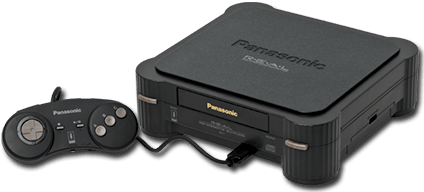
The 3DO Interactive Multiplayer is a fifth-generation home video game console released by the 3DO Company on October 4, 1993. It retailed for $699.99. It had a RISC CPU ARM60 at 12.5 MHz with 2MB of RAM and 1MB of VRAM.
This system scrapes metadata for the 3do group and loads the 3do set from the currently selected theme, if available.
Quick reference
- Emulator: RetroArch
- Core: libretro/opera
- Folder:
/userdata/roms/3do - Accepted ROM formats:
.iso,.chd,.cue
BIOS
| MD5 checksum | Share file path | Description |
|---|---|---|
| f47264dd47fe30f73ab3c010015c155b | bios/panafz1.bin | |
| 51f2f43ae2f3508a14d9f56597e2d3ce | bios/panafz10.bin | |
| 8639fd5e549bd6238cfee79e3e749114 | bios/goldstar.bin |
ROMs
Place your 3DO ROMs in /userdata/roms/3do/.
The recommended format to save space maintaining full compatiblity is CHD.
Emulators
RetroArch
RetroArch (formerly SSNES), is a ubiquitous frontend that can run multiple “cores”, which are essentially the emulators themselves. The most common cores use the libretro API, so that's why cores run in RetroArch in Batocera are referred to as “libretro/(core name)”. RetroArch aims to unify the feature set of all libretro cores and offer a universal, familiar interface independent of platform.
RetroArch configuration
RetroArch offers a Quick Menu accessed by pressing [HOTKEY] +  which can be used to alter various things like RetroArch and core options, and controller mapping. Most RetroArch related settings can be altered from Batocera's EmulationStation.
Standardized features available to all libretro cores: 3do.videomode, 3do.ratio, 3do.smooth, 3do.shaders, 3do.pixel_perfect, 3do.decoration, 3do.game_translation
ES setting name batocera.conf_key | Description ⇒ ES option key_value |
|---|---|
| Settings that apply to all cores of this emulator | |
GRAPHICS BACKEND 3do.gfxbackend | Choose your graphics rendering ⇒ OpenGL opengl, Vulkan vulkan. |
AUDIO LATENCY 3do.audio_latency | Audio latency in milliseconds, turn it up if you hear crackles ⇒ 256 256, 192 192, 128 128, 64 64, 32 32, 16 16, 8 8. |
THREADED VIDEO 3do.video_threaded | Improves performance at the cost of latency and more video stuttering. Use only if full speed cannot be obtained otherwise. ⇒ On true, Off false. |
libretro/Opera
Opera is an open-source, low-level emulator for the 3DO Game Console. Opera is a fork of 4DO, originally a port of 4DO, itself a fork of FreeDO, to libretro. The fork/rename occurred due to the original 4DO project being dormant and to differentiate the project due to new development and focus.
We use the latest libretro core. See the official documentation for more information.
libretro/Opera configuration
ES setting name batocera.conf_key | Description ⇒ ES option key_value |
|---|---|
| Settings that apply to all systems this core supports | |
VIDEO RESOLUTION global.high_resolution | The default internal resolution is 320×240, but the output resolution is 640×480. This feature makes the system behave as if it has a 640×480 framebuffer. Does not affect 2D sprites. ⇒ 320×240 disabled, 640×480 enabled. |
CPU OVERCLOCK global.cpu_overclock | The 3DO used a 12.5MHz ARM60 CPU as its central processor. The emulator has implemented a CPU overclocking feature in the Opera core so that you can increase performance up to 2x (good for NFS). Example video. Good for demanding games like NFS, but may not have an impact on all games. An overclock of 1.5x is recommended if using overclocking at all. ⇒ 1.0x (12.50Mhz) 1.0x (12.50Mhz), 1.1x (13.75Mhz) 1.1x (13.75Mhz), 1.2x (15.00Mhz) 1.2x (15.00Mhz), 1.5x (18.75Mhz) 1.5x (18.75Mhz), 1.6x (20.00Mhz) 1.6x (20.00Mhz), 1.8x (22.50Mhz) 1.8x (22.50Mhz), 2.0x (25.00Mhz) 2.0x (25.00Mhz). |
ACTIVE INPUT DEVICES FIX global.active_devices | There is a bug in which having more than 1 controller emulated causes the game not to respond to input. This allows working around the issue. Set it to 1 when playing alone, otherwise to the number of connected players/controllers. ⇒ 1 1, 2 2, 3 3, 4 4, 5 5, 6 6, 7 7, 8 8. |
ADDITIONAL GAME FIXES global.game_fixes_opera | Several game fixes and time hacks. Leave it to auto or configure it game specific. ⇒ Off disabled, Alone in the Dark timing_hack6, Crash'n Burn timing_hack1, Dinopark Tycoon timing_hack3, Microcosm timing_hack5. |
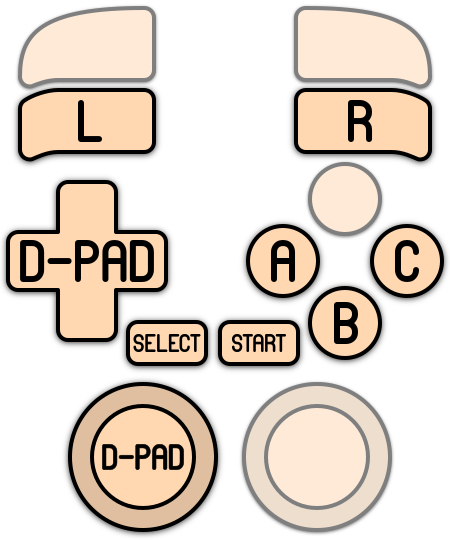
Controls

Troubleshooting
For further troubleshooting, refer to the generic support pages.
- systems/3do.1637974138.txt.gz
- Last modified: 5 years ago
- by atari