This is an old revision of the document!
This article needs some TLC. Read at your own risk.

MSX2
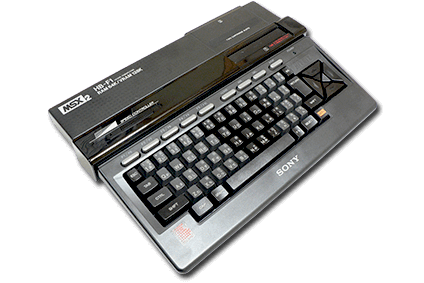
The MSX2 is a computer developed by Microsoft. It was released in 1985. Notable titles include Metal Gear.
Despite this being a product of Microsoft, it's likely you've never heard of this computer. It was primarily popular in the Asian, South American and European regions, but virtually unknown in North America.
Manufacturing was split up among a wide range of companies, including Pioneer, Panasonic, Sharp, Sony, Sanyo, Philips and LG Goldstar. Therefore, there were many different alternative names for the system, including:
- Panasonic FS-A1
- Panasonic FS-A1mkII
- Toshiba FS-TM1
This system scrapes metadata for the “msx” group and loads the msx2 set from the currently selected theme, if available.
Grouped with the “msx” group of systems.
Quick reference
- Emulator: RetroArch
- Cores available: libretro: blueMSX, libretro: fMSX
- Folder:
/userdata/roms/msx2 - Accepted ROM formats:
.dsk,.mx2,.rom,.zip,.7z,.cas,.m3u
BIOS
Todo: This whole section… are all these BIOS files even required?
Download the BlueMSX standalone at http://bluemsx.msxblue.com/rel_download/blueMSXv282full.zip
Then extract the “Databases” and “Machines” folders and add them to the bios folder.
CARTS.SHA CYRILLIC.FNT DISK.ROM FMPAC.ROM FMPAC16.ROM ITALIC.FNT KANJI.ROM MSX.ROM MSX2.ROM MSX2EXT.ROM MSX2P.ROM MSX2PEXT.ROM MSXDOS2.ROM PAINTER.ROM RS232.ROM
ROMs
Place your MSX2 ROMs in /userdata/roms/msx2.
Multi-disk games
Some MSX2 games require multiple disks to play. This can be handled by RetroArch using a M3U playlist. For example:
- test-game.m3u
test game disk 1.dsk
test game disk 2.dsk
test game disk 3.dsk
Batocera will automatically hide the extra disk files and only show the M3U playlist as the playable game in EmulationStation.
Emulators
RetroArch
RetroArch (formerly SSNES), is a ubiquitous frontend that can run multiple “cores”, which are essentially the emulators themselves. The most common cores use the libretro API, so that's why cores run in RetroArch in Batocera are referred to as “libretro: (core name)”. RetroArch aims to unify the feature set of all libretro cores and offer a universal, familiar interface independent of platform.
RetroArch configuration
RetroArch offers a Quick Menu accessed by pressing [HOTKEY] +  which can be used to alter various things like RetroArch and core options, and controller mapping. Most RetroArch related settings can be altered from Batocera's EmulationStation.
Standardized features available to all libretro cores: msx2.videomode, msx2.ratio, msx2.smooth, msx2.shaders, msx2.decoration, msx2.game_translation
ES setting name batocera.conf_key | Description ⇒ ES option key_value |
|---|---|
| Settings that apply to all cores of this emulator | |
GRAPHICS API msx2.gfxbackend | Choose which graphics API library to use. Vulkan is better, when supported. ⇒ OpenGL opengl, Vulkan vulkan. |
AUDIO LATENCY msx2.audio_latency | In milliseconds. Can reduce crackling/cutting out. ⇒ 256 256, 192 192, 128 128, 64 64, 32 32, 16 16, 8 8. |
THREADED VIDEO msx2.video_threaded | Improves performance at the cost of latency and more video stuttering. ⇒ On true, Off false. |
libretro: blueMSX
blueMSX is a cycle-accurate, open-source MSX/SVI/ColecoVision/SG-1000 emulator with high compatibility. This is the libretro port of it.
libretro: blueMSX configuration
ES setting name batocera.conf_key | Description ⇒ ES option key_value |
|---|---|
| Settings that apply to all systems this core supports | |
REDUCE SPRITE FLICKERING global.bluemsx_nospritelimits | Enhancement. Remove the four sprites per line limit. ⇒ Off False, On True. |
All other settings must be adjusted with RetroArch's Quick Menu ([HOTKEY] + ).
libretro: fMSX
libretro: fMSX configuration
Controls
Here are the default MSX2's controls shown on a Batocera RetroPad:

Troubleshooting
Further troubleshooting
For further troubleshooting, refer to the generic support pages.
- systems/msx2.1665478525.txt.gz
- Last modified: 4 years ago
- by atari