This is an old revision of the document!
Sega Dreamcast

The Dreamcast is a sixth-generation console released by Sega on November 27, 1998 in Japan and later on September 9, 1999 in NA. The system is available in most builds, except for rpi1/zero and 2. Here's a fun page about it.
| shortname | dreamcast |
|---|---|
| emulator/core(s) | flycast libretro/flycast redream |
| rom format(s) | .cdi .cue .gdi .chd .m3u |
Emulators
flycast
Flycast is a fork of Reicast (which itself is a fork of nullDC). A highly compatible and accurate standalone emulator.
Flycast cannot be configured in EmulationStation; all configuration must be done via flycast-config in the Applications folder (F1 on the systems screen).
libretro/flycast
A fork of a fork of a fork… this is an identical version of standalone Flycast but inside of a libretro core. Makes use of RetroArch's features.
Configuration
| ES option name | batocera.conf line | Description | Recommendation |
|---|---|---|---|
| SYNCHRONOUS RENDERING | dreamcast.reicast_synchronous_rendering | When threaded rendering is on (on by default), waits for the GPU to finish rendering the frame before dropping the current one. This can avoid certain emulation issues (flashing screens, glitchy video). Significant performance cost. | Auto, as in erase the line. disabled for most games as they don't experience issues (or you have a weak machine), enabled if the game has these particular issues. |
| VIDEO RESOLUTION | dreamcast.reicast_internal_resolution | Enhancement. Increases the rendering resolution. Makes 3D objects clearer. Significant performance cost. Values: 640×480, 1280×960, 1920×1440, 2560×1920 and other multiples of 640×480 up to 12800×9600. | 640×480 for native, closest your screen's resolution if your system can handle it. Absurdly high values can degrade image quality (pixels beginning to shimmer). |
| TEXTURES MIP-MAPPING (BLUR) | dreamcast.reicast_mipmapping | Enables mip-mapping to smooth out textures on distant 3D objects based on distance and angle. Dreamcast games natively utilized mipmapping to get extra performance out of the hardware, but the extra bluriness from doing this is more apparent on modern, higher fidelity screens. Has a minimal performance cost. | enabled should be used in conjunction with anisotropic filtering to mitigate bluriness. Some users may prefer the 'sharpness' of disabled better. |
| ANISOTROPIC FILTERING | dreamcast.reicast_anisotropic_filtering | Enables anisotropic filtering to enhance perspective textures. Dramatically improves the clarity of textures on distant 3D objects when mip-mapping is turned on, especially at higher internal resolutions. Test Drive: Le Mans is the only Dreamcast game that natively utilizes this. Has a small performance cost. Values: False, 2, 4, 8 or 16. | 16 when mip-mapping is also enabled, False otherwise. |
| TEXTURES UPSCALING (XBRZ) | dreamcast.reicast_texupscale | Enhancement. Applies xBRZ upscaling to textures to improve their clarity. Improvements are subjective. Values: False, 2x, 4x or 6x. | False |
| RENDER TO TEXTURES UPSCALING | dreamcast.reicast_render_to_texture_upscaling | Enhancement. Some 3D games would capture the screen output and render it as a 2D texture (eg. pause menu in Crazy Taxi and Dead or Alive), being unaffected by reicast_internal_resolution. This setting multiplies the resolution of that capture. Example here. Values: 1x, 2x, 3x, 4x or 8x. | 1x for native, 4x for close-to 1080p rendering if also upscaling reicast_internal_resolution. |
| FRAME SKIP | dreamcast.reicast_frame_skipping | Skip frames to improve performance, at the cost of choppy motion. Higher values can cause motion sickness if used for extended periods. Values: disabled, 1, 2, 3, up to 6. | disabled Should only be turned up on weak hardware and if immune to motion sickness. |
| FORCE WINDOWS CE MODE | dreamcast.reicast_force_wince | Some Dreamcast games (marked “Powered by Microsoft Windows CE” on the box, eg. Sega Rally 2) utilized the MMU Windows Compact Edition API on the Dreamcast to run. Batocera should automatically detect this but in case it doesn't you can manually override it here. Significant performance cost. Values: disabled or enabled. | Auto, as in erase the line. disabled unless needed. |
| WIDESCREEN CHEAT (PRIORITY) | dreamcast.reicast_widescreen_cheats | Enhancement. Flycast has a database of cheats that can enable widescreen support in certain games, rendering them in anamorphic widescreen without changing the internal resolution. | disabled Some games also natively support widescreen in their in-game options. |
| WIDESCREEN HACK | dreamcast.reicast_widescreen_hack | Enhancement. Changes the internal resolution to a widescreen ratio (eg. 640×480 becomes 853×480). Somewhat glitchy. | disabled Some games also natively support widescreen in their in-game options. |
| CONTROLLER 1 TYPE | dreamcast.controller1_dc | Chooses the controller plugged into port 1. Values: 1 for gamepad, 3 for keyboard, 2 for mouse, 4 for light gun. | 1 |
| CONTROLLER 2 TYPE | dreamcast.controller2_dc | Same as above for port 2. | Same as above. |
| CONTROLLER 3 TYPE | dreamcast.controller3_dc | Same as above for port 3. | Same as above. |
| CONTROLLER 4 TYPE | dreamcast.controller4_dc | Same as above for port 4. | Same as above. |
All other settings can be configured from RetroArch's Quick Menu > Options (Hotkey+ ).
).
redream
Redream is a multi-platform standalone emulator. Has high compatibility with low system requirements. Lacks some options compared to Flycast.
You cannot exit Redream via controller as the Hotkey+Start shortcut opens the Redream menu instead and you cannot navigate to the close button unless you have a mouse.
Redream can only be configured by its menu (Hotkey while running a game).
ROMs
Dreamcast discs are a special form of CD named GD, which are capable of holding up to 1GB of data, compared to the ~700MB capacity of regular CDs. GDs were traditionally dumped off of the original console as GD-ROMs (which contains a game.gdi sheet, info.txt and data.bin/.iso/.raw track(s)), but some more modern tools may use the more universal game.cue sheet and data.bin track format. Most emulators can load either sheet format fine. You should load the .gdi or .cue sheet and not the .bin/.iso/.raw tracks. From Batocera v31 onwards, EmulationStation should avoid making duplicate entries for these files.
If you're currently missing the .gdi or .cue files, check out the section on recovering them on this page.
WinCE games seem to not run on the RPi3B+.
Disc compression
The recommended format for compressing disc images is CHD.
If compressing the image into the CHD format ensure that you are using chdman version 0.230 or later, as earlier versions have issues with Dreamcast images. If your compressed ROMs are failing to launch in Batocera, users have reported having more success making chdman target a .gdi file instead of a .cue file. Most online .bat scripts only target .cue files. There is a custom version of chman that supports rolling to and from CUE/BIN files here.
Multi-disc games
To automatically load the next disc of a game, you can use a .m3u playlist file. To make one, simply create a text file with the same filename as your intended game name (it could be anything, really). Within that text file, write the names of the .gdi sheets or .chd files for your game discs. For instance, if your game's .gdi sheets were structured like
roms/
└─ dreamcast/
   ├─ Shenmue (Disc 1).gdi
   ├─ Shenmue (Disc 1).bin
   ├─ Shenmue (Disc 2).gdi
   ├─ Shenmue (Disc 2).bin
   ├─ Shenmue (Disc 3).gdi
   ├─ Shenmue (Disc 3).bin
   ├─ Shenmue (Passport disc).gdi
   └─ Shenmue (Passport disc).bin
you would put the following as text into the Shenmue.m3u text file:
- Shenmue.m3u
Shenmue (Disc 1).gdi
Shenmue (Disc 2).gdi
Shenmue (Disc 3).gdi
Shenmue (Passport disc).gdi
Save the text file with the file extension .m3u and place it in the dreamcast folder along with the game's discs. When you get to the end of that disc, the next disc will be automatically loaded. In libretro cores, if this fails, you can utilize Retroarch's 'Disc Control' menu in the Quick Menu (Hotkey+) to manually eject a disc and insert another (Swap Disc is for legacy purposes and should not be used). Refer to multi-disc games for more info.
Controls
Each emulator handles the Hotkey, its chords and the Select button differently.
- libretro/flycast
- Hotkey by itself does nothing.
- Hotkey+Start closes the emulator.
- Select does nothing.
- Flycast standalone
- Hotkey by itself opens Flycast's quick menu.
- Hotkey+Start closes the emulator.
- Select does nothing.
- Redream
- Hotkey by itself opens Redream's menu.
- Hotkey+Start does nothing.
- Select toggles fast-forward.
The Hotkey+L shortcut, which ordinarily takes a screenshot, will instead eject the disc in libretro/flycast. Practice caution!
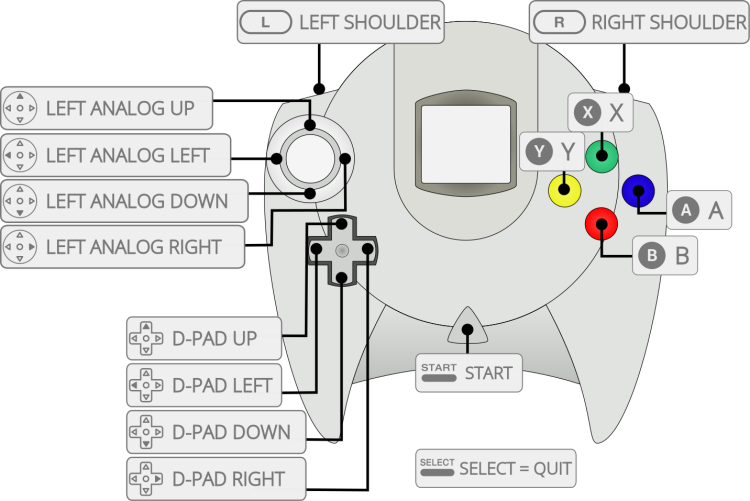
 (The Select button and shoulder buttons are incorrect.)
The default button mapping to the Dreamcast controller is as follows (ignore the Select button, L+R are assigned to L2+R2 on the Retropad):
(The Select button and shoulder buttons are incorrect.)
The default button mapping to the Dreamcast controller is as follows (ignore the Select button, L+R are assigned to L2+R2 on the Retropad):
- systems/dreamcast.1636011369.txt.gz
- Last modified: 5 years ago
- by atari