This is an old revision of the document!

Atomiswave
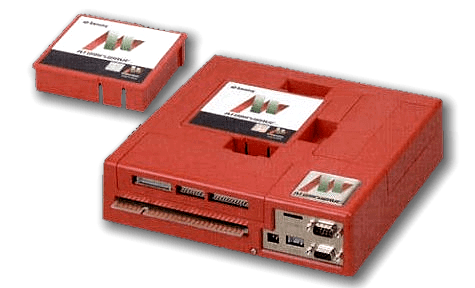
The Atomiswave is a arcade developed by the Sammy Corporation. It was released in 2003. It is based on Sega's Dreamcast console, and thus shares a lot of its hardware with it. Because of this, emulation of NAOMI games is usually best done with a Dreamcast emulator (modifications have already been made to allow for this in Flycast, for instance).
The Atomiswave is known for using interchangeable game cartridges for its games, allowing for easy switching between them. In this same vein, the cabinet's control panel could be swapped out as well, allowing for a variety of sticks, lightguns and steering wheel peripherals to be used by a single system.
This system scrapes metadata for the “atomiswave” and “arcade” groups and loads the atomiswave set from the currently selected theme, if available.
Quick reference
- Accepted ROM formats:
.lst,.bin,.dat,.zip,.7z - Folder:
/userdata/roms/atomiswave
| Emulators |
|---|
| libretro: Flycast |
| Flycast |
BIOS
| MD5 checksum | Share file path | Description |
|---|---|---|
0ec5ae5b5a5c4959fa8b43fcf8687f7c | bios/awbios.zip |
ROMs
Place your Atomiswave ROMs in /userdata/roms/atomiswave.
Emulators
RetroArch
RetroArch (formerly SSNES), is a ubiquitous frontend that can run multiple “cores”, which are essentially the emulators themselves. The most common cores use the libretro API, so that's why cores run in RetroArch in Batocera are referred to as “libretro: (core name)”. RetroArch aims to unify the feature set of all libretro cores and offer a universal, familiar interface independent of platform.
RetroArch configuration
RetroArch offers a Quick Menu accessed by pressing [HOTKEY] +  which can be used to alter various things like RetroArch and core options, and controller mapping. Most RetroArch related settings can be altered from Batocera's EmulationStation.
Standardized features available to all libretro cores: atomiswave.videomode, atomiswave.ratio, atomiswave.smooth, atomiswave.shaders, atomiswave.pixel_perfect, atomiswave.decoration, atomiswave.game_translation
ES setting name batocera.conf_key | Description ⇒ ES option key_value |
|---|---|
| Settings that apply to all cores of this emulator | |
GRAPHICS BACKEND atomiswave.gfxbackend | Choose your graphics rendering ⇒ OpenGL opengl, Vulkan vulkan. |
AUDIO LATENCY atomiswave.audio_latency | Audio latency in milliseconds, turn it up if you hear crackles ⇒ 256 256, 192 192, 128 128, 64 64, 32 32, 16 16, 8 8. |
THREADED VIDEO atomiswave.video_threaded | Improves performance at the cost of latency and more video stuttering. Use only if full speed cannot be obtained otherwise. ⇒ On true, Off false. |
libretro: Flycast
A fork of a fork of a fork… this is an identical version of standalone Flycast but inside of a libretro core. Makes use of RetroArch's features.
libretro: Flycast configuration
ES setting name batocera.conf_key | Description ⇒ ES option key_value |
|---|---|
| Settings that apply to all systems this core supports | |
SYNCHRONOUS RENDERING global.reicast_synchronous_rendering | Wait for the GPU to render frames instead of skipping ⇒ Off disabled, On enabled. |
VIDEO RESOLUTION global.reicast_internal_resolution | Improve the fidelity of 3D models (does not affect 2D sprites) ⇒ 640×480 640×480, 800×600 800×600, 960×720 960×720, 1024×768 1024×768, 1280×960 1280×960, 1440×1080 1440×1080, 1600×1200 1600×1200, 1920×1440 1920×1440, 2560×1920 2560×1920, 3200×2400 3200×2400, 3840×2880 3840×2880, 4480×3360 4480×3360, 5120×3840 5120×3840, 5760×4320 5760×4320, 6400×4800 6400×4800, 7040×5280 7040×5280, 7680×5760 7680×5760. |
TEXTURE MIP-MAPPING (BLUR) global.reicast_mipmapping | Smooths out textures on 3D objects ⇒ Off disabled, On enabled. |
ANISOTROPIC FILTERING global.reicast_anisotropic_filtering | Enhance the quality of distant perspective textures ⇒ Off False, 2x 2, 4x 4, 8x 8, 16x 16. |
TEXTURE UPSCALING (XBRZ) global.reicast_texupscale | Upscaling 2D pixel art graphics (2D Games Only) ⇒ Off False, 2x 2x, 4x 4x, 6x 6x. |
RENDER TO TEXTURE UPSCALING global.reicast_render_to_texture_upscaling | Upscaling textures resolution on 3D objetcs ⇒ Off 1x, 2x 2x, 3x 3x, 4x 4x, 8x 8x. |
FRAME SKIP global.reicast_frame_skipping | Skip frames to improve performance (smoothness) ⇒ Off disabled, 1 1, 2 2, 3 3, 4 4, 5 5, 6 6. |
FORCE WINDOWS CE MODE global.reicast_force_wince | Enable full MMU emulation for Windows CE games ⇒ Off disabled, On enabled. |
WIDESCREEN CHEAT (PRIORITY) global.reicast_widescreen_cheats | You must use a 16/9 RATIO and disable BEZEL ⇒ Off disabled, On enabled. |
WIDESCREEN HACK global.reicast_widescreen_hack | You must use a 16/9 RATIO and disable BEZEL ⇒ Off disabled, On enabled. |
CONTROLLER 1 TYPE global.controller1_dc | Select Gamepad, Keyboard, Mouse or Light Gun ⇒ Gamepad 1, Keyboard 3, Mouse 2, Light Gun 4. |
CONTROLLER 2 TYPE global.controller2_dc | Select Gamepad, Keyboard, Mouse or Light Gun ⇒ Gamepad 1, Keyboard 3, Mouse 2, Light Gun 4. |
CONTROLLER 3 TYPE global.controller3_dc | Select Gamepad, Keyboard, Mouse or Light Gun ⇒ Gamepad 1, Keyboard 3, Mouse 2, Light Gun 4. |
CONTROLLER 4 TYPE global.controller4_dc | Select Gamepad, Keyboard, Mouse or Light Gun ⇒ Gamepad 1, Keyboard 3, Mouse 2, Light Gun 4. |
| Settings specific to atomiswave | |
SCREEN ORIENTATION atomiswave.screen_rotation_atomiswave | Rotate screen for some arcade games ⇒ Horizontal horizontal, Vertical vertical. |
| Settings specific to naomi | |
SCREEN ORIENTATION naomi.screen_rotation_naomi | Rotate screen for some arcade games ⇒ Horizontal horizontal, Vertical vertical. |
All other settings can be configured from RetroArch's Quick Menu → Options ([HOTKEY] + ).
Flycast
Flycast is a fork of Reicast (which itself is a fork of nullDC). A highly compatible and accurate standalone Dreamcast emulator.
Flycast can also be used to run Atomiswave arcade games due to being nearly identical hardware.
Flycast configuration
Standardized features available to all cores of this emulator: naomi.videomode, naomi.ratio
Flycast cannot be configured in EmulationStation; all other configuration must be done via the flycast-config in the Applications folder ([F1] on the systems screen).
Controls

Troubleshooting
Further troubleshooting
For further troubleshooting, refer to the generic support pages.
- systems/atomiswave.1638430929.txt.gz
- Last modified: 5 years ago
- by atari