This is an old revision of the document!
This article needs some TLC. Read at your own risk.

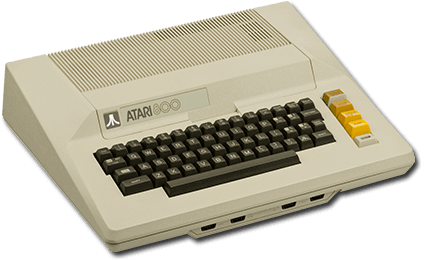
Atari 800
The Atari 800 is a line of computers developed by Atari. The first computers in the line, 400 and 800, were released in 1979.
The first two models, the 400 and 800, had the 16KB and 48KB of user-expandable RAM installed, while the later XL and XE models would have 64KB and 128KB installed, populating all the available slots.
The current emulation of the Atari 800 based family of computers is not complete or fail safe. This wiki article only gives basic instructions so you can run some popular games. The full technical background on these issues can be found in this article: Atari 8-Bit Guide (Raph Koster). The script mentioned in these pages is not integrated into Batocera yet, so you are stuck with the manual fixes until then.
This system scrapes metadata for the “atari800” group and loads the atari800 set from the currently selected theme, if available.
Quick reference
- Emulator: RetroArch
- Core: libretro: atari800
- Folder:
/userdata/roms/atari800 - Accepted ROM formats:
.rom,.xfd,.atr,.atx,.cdm,.cas,.car,.bin,.a52,.xex,.zip,.7z
BIOS
No Atari 800 emulator in Batocera needs a BIOS file to run.
There are subtle differences in machine type between the different Atari Computers, including different version of the OS (BIOS). Some games will crash unless you manually select a different BIOS.
This is conflicting information, which is correct?
ROMs
Place your Atari 800 ROMs in /userdata/roms/atari800.
Multi-Disk games can only be used with an internal menu of the emulator. Playlists and RetroArch features for these games are not supported.
Emulators
RetroArch
RetroArch (formerly SSNES), is a ubiquitous frontend that can run multiple “cores”, which are essentially the emulators themselves. The most common cores use the libretro API, so that's why cores run in RetroArch in Batocera are referred to as “libretro: (core name)”. RetroArch aims to unify the feature set of all libretro cores and offer a universal, familiar interface independent of platform.
RetroArch configuration
RetroArch offers a Quick Menu accessed by pressing [HOTKEY] +  which can be used to alter various things like RetroArch and core options, and controller mapping. Most RetroArch related settings can be altered from Batocera's EmulationStation.
Standardized features available to all libretro cores: atari800.videomode, atari800.ratio, atari800.smooth, atari800.shaders, atari800.pixel_perfect, atari800.decoration, atari800.game_translation
ES setting name batocera.conf_key | Description ⇒ ES option key_value |
|---|---|
| Settings that apply to all cores of this emulator | |
GRAPHICS API atari800.gfxbackend | Choose which graphics API library to use. Vulkan is better, when supported. ⇒ OpenGL opengl, Vulkan vulkan. |
AUDIO LATENCY atari800.audio_latency | In milliseconds. Can reduce crackling/cutting out. ⇒ 256 256, 192 192, 128 128, 64 64, 32 32, 16 16, 8 8. |
THREADED VIDEO atari800.video_threaded | Improves performance at the cost of latency and more video stuttering. Use only if full speed cannot be obtained otherwise. ⇒ On true, Off false. |
libretro: atari800
A libretro port of Atari800. Originally written by David Firth in 1995 and released under the GPL.
libretro: atari800 configuration
ES setting name batocera.conf_key | Description ⇒ ES option key_value |
|---|---|
| Settings specific to atari800 | |
ATARI SYSTEM atari800.atari800_system | Choose what Atari System to emulate. ⇒ 400/600XL/800 (48K) (OS B) 400/800 (OS B), 800XL/1200XL/XEGS (64K) 800XL (64K), 130XE (128K) 130XE (128K), Modern XL/XE (320K CS) Modern XL/XE(320K CS), Modern XL/XE (576K) Modern XL/XE(576K), Modern XL/XE (1088K) Modern XL/XE(1088K). |
VIDEO FORMAT STANDARD atari800.atari800_ntscpal | Switch frequency and resolution by region. ⇒ NTSC 240x480px 60Hz NTSC, PAL 288x576px 50Hz PAL. |
SIO ACCELERATION atari800.atari800_sioaccel | Speeds up the virtual file loading. Some games won't load with this enabled. ⇒ Off disabled, On enabled. |
HI-RES ARTIFACTING atari800.atari800_artifacting | Emulate NTSC quirks to show more colors in hi-res mode. Most NTSC games took advantage of this quirk to show more than just two colors on the screen at once. Only very few PAL games were designed to only use two colors. ⇒ Off disabled, On enabled. |
INTERNAL RESOLUTION atari800.atari800_resolution | Use an alternate resolution. Some games need this. ⇒ 336×240 336×240, 320×240 320×240, 384×240 384×240, 384×272 384×272, 384×288 384×288, 400×300 400×300. |
| Settings specific to atari5200 | |
JOYSTICK HACK (FOR ROBOTRON 2084) atari5200.atari800_opt2 | Treats the right analog stick as the second joystick. ⇒ Off disabled, On enabled. |
Controls
Analogue joysticks are supported only via hard-coded mouse inputs (bypassing RetroPad and default controls). The analog sticks of gamepads are NOT supported. This makes some games unplayable unless you connect a mouse.
Sure that it's not possible to remap them?
Here are the default Atari 800's controls shown on a Batocera Retropad:

Troubleshooting
My game is black and white!
Many (US) games look wrong because they use specific video artifacts to generate colors on NTSC TVs but look black and white in emulation, unless you set specific parameters.
What parameters?
Game is not booting
Most ROM sets are in a format that requires one additional input at the start of a ROM. Sometimes the selection screen is not visible making it look like the emulator crashed.
So what buttons are common to try to get out of this?
Further troubleshooting
For further troubleshooting, refer to the generic support pages.
- systems/atari800.1646042963.txt.gz
- Last modified: 5 years ago
- by atari