This is an old revision of the document!
Pad2key
This functionality can help you create a per-game mapping of your controller to keyboard keys, in order to play games from old computers like Apple II, Sinclair or DOS and Windows games that are finicky with their joypad support.
Define a new pad2key mapping
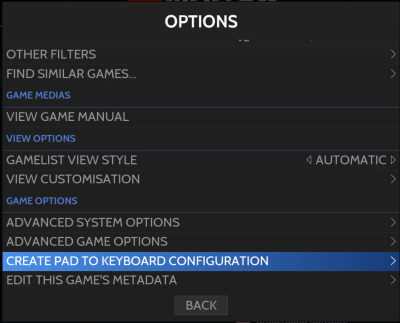
The first thing to do is to select a game and press select to get the game option menu, and select Create pad to keyboard configuration.
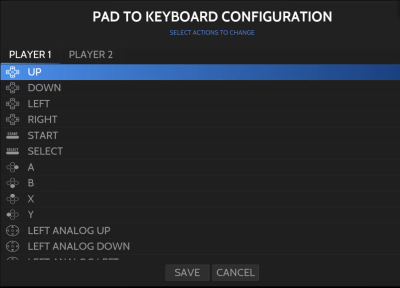
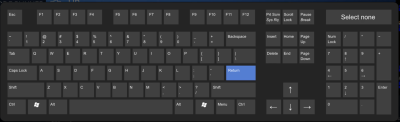
Then you will have the option to select keys for each button/axis on your gamepad, both for player 1 and player 2. For each button/direction you click, you will be presented with a virtual keyboard to select the key you want to map to.
Configuration file
Once your pad2key configuration is done, it stays saved as a padto.keys or game_name.keys file next to your rom/in your Windows game directory folder. It is a plain JSON file with, for example:
  {
  "actions_player1": [
      {
          "trigger": [
              "hotkey",
              "start"
          ],
          "type": "key",
          "target": [
              "KEY_LEFTALT",
              "KEY_F4"
          ]
      },
      {
          "trigger": "up",
          "type": "key",
          "target": "KEY_UP"
      },
      {
          "trigger": "down",
          "type": "key",
          "target": "KEY_DOWN"
      },
      {
          "trigger": "a",
          "type": "key",
          "target": "KEY_RIGHTSHIFT"
      }
    ]
 }
Pad2keys config files can be scraped off screenscraper.fr, if you have enabled the option for it.
You can find some examples from the Content Downloader for Windows games like Ri-Li or Super Mario War, both with embedded pad2key config files.
Launching commands with the pad2key
As you saw earlier, the pad2key can be used to simulate keyboard presses, however, it can also be used to launch specific commands, you need to replace the “type” : “key” to “type” : “exec”, and set the “target” to the command.
for exemple:
        {
            "trigger": [
                "hotkey",
                "pageup"
            ],
            "type": "exec",
            "target": "batocera-screenshot"
        }
can be used to launch the batocera-screenshot command with the hotkey+L combo, effectively letting you screenshot in systems that don't support a screenshot feature, but that support the pad2key.
- emulators/pad2key.1616057664.txt.gz
- Last modified: 6 years ago
- by fishou