Table of Contents
Benchmarking for Batocera Guide
Batocera covers a very complex landscape of both hardware it supports and systems it can emulate. Getting a rough idea of where your hardware stands and what sort of systems you can expect to emulate at full-speed can be extremely difficult for someone not already intimate familiar with the emulation and hardware scenes. Help us help them by providing some easy-to-parse benchmarks so they can make a more informed decision.
Requirements for benchmarking (so as to create a fair and reproducible result):
- This is running on a machine connected to a 1920×1080 60 Hz display. Lower resolution displays are acceptable, but try to get as close to the full-HD standard as possible. Going above can result in unfair poor performance, which is not representative of the hardware's capabilities.
- Leave all the settings at their default “AUTO” mode. In a way, Batocera's defaults can be considered as differences in development between versions of Batocera.
- Running the game off the internal drive. Network shares or external drives may have unrelated storage speed access issues that negatively affect games.
For Batocera's benchmarking purposes, it's really only necessary to see whether a game is running at full-speed or not. There is no ambiguity with this sort of system and is easy to understand by all.
You can enable the FPS counter by going to SYSTEM SETTINGS → FRONTEND DEVELOPER OPTIONS → SHOW FPS COUNTER and turning it on.
What is considered "full-speed"?
- For a 60 FPS game, anything between 57 to 60 FPS (95%) without noticeable stutters (more than half a second) would be considered full-speed. Micro-stutters (less than a 60th of a second) can usually be explained by hardware configuration and slightly less-than-optimal default settings, and should be ignored.
- For 50 FPS games (like PAL region games), the same but anything between 47 to 50 FPS (95%) instead.
- For games that run easily at full-speed, try increasing the rendering scale by an integer multiplication. Things like 2x resolution, 3x, 4x, etc. until you reach the setting where emulation is no longer full-speed. For systems where upscaling the rendering resolution is not possible, just write down “Full-speed” instead. For systems where the highest rendering resolution still runs at full-speed, write down “Max” (consider removing such systems from the benchmark if the high-end game runs at full-speed with “Max” rendering).
- Consider the speed of the game running during its regular gameplay, not during menus or transition screens. On that note, sometimes the “first area” of a game is significantly easier to render than other parts, be sure to move into other areas to make sure.
- For games that don't run at full-speed, note down the average speed in percentage for that system including the FPS in parenthesis (this is very subjective, but do what you feel is the best representation of the performance, some users may still find a “mostly full-speed” game acceptable to play).
- For games that are otherwise fine on other systems but crash/fail to render anything/other major issue, put down N/A and add a footnote indicating the issue.
If you'd like a video example to compare to, watch this excellent one by ETA Prime: https://youtu.be/fQ2H842vnMw
- 02:50 - Dreamcast This would be considered full-speed.
- 03:18 - PSX This would be considered full-speed.
- 03:38 - Atomiswave This would be considered full-speed, despite the graphical issues. Theoretically, this could be fixed by using the proper drivers/settings in the emulator.
- 04:03 - N64 This would be considered full-speed (he did not test upscaling in this example).
- 04:54 - PSP This would be considered “3x”.
- 06:22 - Gamecube For low-end games, this would be considered “1x”. For high-end games, due to the drop down to 83% (50 FPS), this would not be full-speed.
- 07:38 - PS2 This would not be full-speed, as hacks/alternative regions needed to be utilized to achieve such a speed. Benchmarking should only consider performance at default settings.
If running a version of Batocera before v35, for systems that might be running a Nvidia card, do try to get the official Nvidia drivers working. If it's really old, you may have to use the legacy build. If the CPU/motherboard is too old for even that, you may have to use an even older version of Batocera (such as 5.26).
Games to test
The point of this list isn't to be exhaustive, but to be representative of the rough lower and upper bounds of an emulated system's capabilities. For this, games that are both low/high-end while still being relatively well-known have been selected. Systems less demanding than SNES are considered to be low-requirement enough that pretty much all x86_64 machines can run them at full-speed. It is suitable to notate just the system variation you benchmarked (with exception to GameCube/Wii as they are nearly the same underlying system).
Take this list as all the available suggested titles for benchmarking. It's recommended to take one or two titles from each tier of “DEMANDING” level, resulting in a benchmarking table that contains five to eight games total. Feel free to exclude systems/titles that don't offer much information. For instance, if a system runs full-speed for both the low-end and high-end titles, only the high-end title needs to be mentioned. Additional titles/systems not mentioned here can be included if you feel they are relevant to the performance of the hardware (or you just happen to have already installed instead). Roughly in order of performance required:
- LESS DEMANDING SYSTEMS
- SNES
- Low-end SNES (Super Mario World)
- High-end SNES (Super Mario World 2: Yoshi's Island)
- MAME2003
- Low-end MAME2003 (Asteroids Deluxe/Pacman/Space Invaders)
- High-end MAME2003 (Puzzle Bobble 2)
- PSX
- Low-end PSX (Metal Slug X)
- High-end PSX (Bloody Roar/Bloody Roar 2: The New Breed)
- N64
- Low-end N64 (Super Mario 64)
- High-end N64 (Goldeneye 007/Perfect Dark)
- NDS
- Low-end NDS (Tetris DS)
- High-end (Pokemon Diamond/Pokemon Pearl/Solatorobo The Red Hunter)
- DEMANDING SYSTEMS
- MAME
- Low-end MAME (Asteroids Deluxe/Pacman/Space Invaders)
- High-end MAME (Gauntlet Legends)
- PSP
- Low-end PSP (Mega Man Maverick Hunter X/Hatsune Miki - Project DIVA)
- High-end PSP (God of War: Chains of Olympus/Midnight Club: L.A. Remix/Tekken 6)
- Dreamcast/Naomi
- Low-end Dreamcast/Naomi (Marvel vs. Capcom 2: New Age of Heroes)
- High-end Dreamcast/Naomi (Sega Rally 2/NBA 2K2)
- GameCube/Triforce/Wii1)
- Low-end GameCube/Triforce/Wii (Mario Kart Double Dash)
- High-end GameCube/Triforce/Wii (Metroid Prime 2: Echoes/Super Smash Bros. Melee/Auto Modellista/F-Zero GX)2)
- 3DS3)
- Low-end 3DS (Super Mario 3D Land)
- High-end 3DS (Pokémon Sun and Moon/Kid Icarus: Uprising)
- VERY DEMANDING SYSTEMS
- Saturn
- Low-end Saturn (Saturn Bomberman)
- High-end Saturn (Panzer Dragoon/Sega Rally Championship)
- Wii U4)
- Low-end Wii U (Super Mario Maker/Super Mario Bros. U)
- High-end Wii U (Breath of the Wild)
- PS2
- Low-end PS2 (Monster Hunter/Tekken 5/Sonic Riders/Sonic Riders: Zero Gravity/Beatmania/Marvel vs Capcom 2: New Age of Heroes)
- High-end PS2 (God of War/Gran Turismo 4/Shadow of the Colossus)
- Xbox
- Low-end Xbox (Jet Set Radio Future)
- High-end Xbox (Halo: Combat Evolved, Burnout 3: Takedown)
- PS3
- Low-end PS3 (Hatsune Miku Project DIVA F/Hard Corps: Uprising/Castlevania: Lords of Shadow)
- High-end PS3 (Red Dead Redemption/GTA V/Sonic Unleashed/God of War 3)
- Xbox 360
- Low-end Xbox 360 (Hexic)
- High-end Xbox 360 (Sonic Unleashed)
Here's an example benchmark for reference:
Batocera v33
| CPU | GPU | High-end N64 (Goldeneye 007) | High-end PSP (Midnight Club: L.A. Remix) | Low-end Dreamcast (MvC2) | High-end Dreamcast (Sega Rally 2) | High-end GameCube/Wii (Auto Modellista) | Low-end PS2 (Sonic Riders: Zero Gravity) | High-end PS2 (God of War) | Low-end Xbox (Jet Set Radio Future) | High-end Xbox (Burnout 3: Takedown) |
|---|---|---|---|---|---|---|---|---|---|---|
| Intel Core i3-4350 | Nvidia GTX 750Ti | Full-speed | Max | Full-speed | 67% (40 FPS) | 5x | 2x | 1x | 4x | N/A5) |
You can also view the already existing benchmark tables at the "Choose a Desktop/Benchmarks" page. Some of the older benchmarks use a different format, but contributions for older versions of Batocera are still accepted.
Once you have such a file, just throw the file (.csv is fine) onto the Discord or edit it in yourself if you've been granted a Batocera Wiki account.
MangoHUD
Batocera's benchmarking is relatively simple, intentionally so. However, if you'd like to do further benchmarking just for the sake of seeing how your hardware is doing you can utilize the MangoHUD program (Batocera v33 and higher).

In order to activate it, simply change the HEADS UP DISPLAY (in the DECORATIONS submenu) to “PERFORMANCE” in either the MAIN MENU → GAME SETTINGS or that system's specific ADVANCED SYSTEM SETTINGS.

MangoHUD has the following keyboard shortcuts:
- Right
[Shift]+[F12]: Toggle HUD - Left
[Shift]+[F4]: Reload Config
Advanced MangoHUD configuration
Environment values can be added to the global.hud_custom key in batocera.conf, each value separated by a \n. For example:
## HUD (x86 only)
# game / perf / custom (in that case, configuration is read from hud_custom)
#global.hud=perf
#global.hud_custom=position=bottom-left\nbackground_alpha=0\nlegacy_layout=false\nfont_size=64\nimage_max_width=200\nimage=%THUMBNAIL%\ncustom_text=%GAMENAME%\ncustom_text=%SYSTEMNAME%\ncustom_text=%EMULATORCORE%
# for example, the value for perf is position=bottom-left\nbackground_alpha=0.9\nlegacy_layout=false\ncustom_text=%GAMENAME%\ncustom_text=%SYSTEMNAME%\ncustom_text=%EMULATORCORE%\nfps\ngpu_name\nengine_version\nvulkan_driver\nresolution\nram\ngpu_stats\ngpu_temp\ncpu_stats\ncpu_temp\ncore_load
- Notes for older Batocera versions (v32 and v31)
-
Batocera's benchmarking is relatively simple, intentionally so. However, if you'd like to do further benchmarking just for the sake of seeing how your hardware is doing you can utilize the MangoHUD program (Batocera v31 and higher).
If on Batocera v31 exactly, you'll need to run
flatpak remote-add --if-not-exists flathub https://flathub.org/repo/flathub.flatpakrepofirst.flatpak install com.valvesoftware.Steam.Utility.MangoHud- From Batocera, launch a libretro game and close it once. This is important.
export DISPLAY=:0.0/etc/init.d/S31emulationstation stop- Check your logs at stdout.log and work out what the launch command was. For paths that contain special characters or whitespaces, you may need to enclose them in double quotes (“). In case it's not obvious, you can (generally) use the example command below, just adapt it to your system/game.
- Then run the run command but with
mangohud '' in front of it, eg. ''mangohud retroarch -L /usr/lib/libretro/snes9x_libretro.so --config /userdata/system/configs/retroarch/retroarchcustom.cfg --verbose "/userdata/roms/snes/Panel de Pon (Japan) [En by Zuqkeo v1.0].zip"
This will get you the following result on-screen (notice the upper left corner):
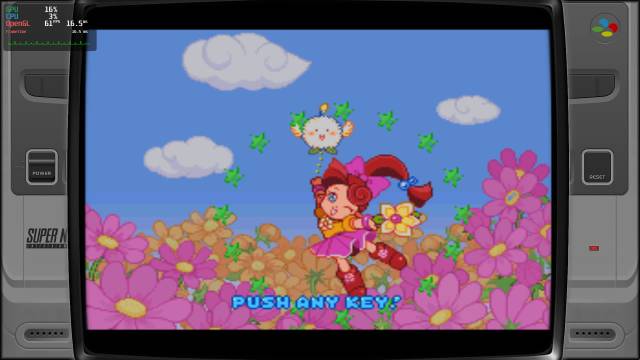
In order to quit the game, you can just hit
[Alt]+[F4]or runbatocera-es-swissknife --emukill. If you'd like to restart ES, runbatocera-es-swissknife –-restart.