Table of Contents

Pico-8
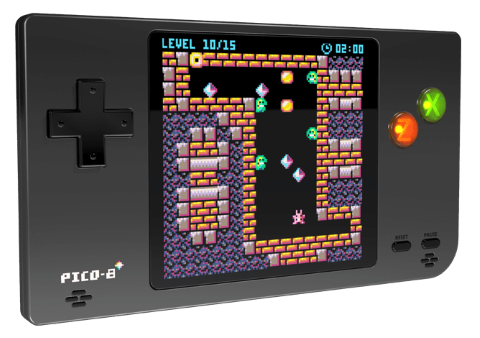
PICO-8 is a fantasy console created by Lexaloffle for playing tiny games inspired by the 8-bit consoles era. It has never been physically released, but runs as a software on computers like Windows / Mac / Linux and web browsers. Lexaloffle doesn't support all SBC, only the Raspberry Pi, and sells a commercial app for developing and running Pico-8 games and programs. If you like this piece of software, please support Lexaloffle and purchase it! It's well worth it.
Fantasy hardware constraints
- Display: 128×128 16 colors
- Cartridge: embedded as PNG images, max 32kB
- Sound: 4 channel chiptunes
- Code: Lua
- Sprites: 256 8×8 sprites
Batocera Linux doesn't embed the commercial program, but it can be added manually if purchased externally. Otherwise, the libretro/retro8 emulator can be used. It doesn't have 100% compatibility but runs most cartridges perfectly fine.
This system scrapes metadata for the “pico8” group(s) and loads the pico8 set from the currently selected theme, if available.
Quick reference
- Emulator: RetroArch
- Core: libretro: retro8
- Folder:
/userdata/roms/pico8 - Accepted ROM formats:
.p8,.png,.m3u
BIOS
No Pico-8 emulator included in Batocera requires BIOS to function.
ROMs
Place your Pico-8 ROMs in /userdata/roms/pico8.
"Cartridges" and games format
Pico-8 games are distributed as PNG images with the actual code, sprites and sounds embedded in them. Those are actual, real image files, that stands as the cartridge art too. You have to “load” the PNG to run the game. You can download hundreds of carts from the official page, the community is very active! Once you select a game, make sure you click on the “cart” link that downloads a .PNG file.
Emulators
RetroArch
RetroArch (formerly SSNES), is a ubiquitous frontend that can run multiple “cores”, which are essentially the emulators themselves. The most common cores use the libretro API, so that's why cores run in RetroArch in Batocera are referred to as “libretro: (core name)”. RetroArch aims to unify the feature set of all libretro cores and offer a universal, familiar interface independent of platform.
RetroArch configuration
RetroArch offers a Quick Menu accessed by pressing [HOTKEY] +  which can be used to alter various things like RetroArch and core options, and controller mapping. Most RetroArch related settings can be altered from Batocera's EmulationStation.
Standardized features available to all libretro cores: pico8.videomode, pico8.ratio, pico8.smooth, pico8.shaders, pico8.pixel_perfect, pico8.decoration, pico8.game_translation
ES setting name batocera.conf_key | Description ⇒ ES option key_value |
|---|---|
| Settings that apply to all cores of this emulator | |
GRAPHICS BACKEND pico8.gfxbackend | Choose your graphics rendering ⇒ OpenGL opengl, Vulkan vulkan. |
AUDIO LATENCY pico8.audio_latency | Audio latency in milliseconds, turn it up if you hear crackles ⇒ 256 256, 192 192, 128 128, 64 64, 32 32, 16 16, 8 8. |
THREADED VIDEO pico8.video_threaded | Improves performance at the cost of latency and more video stuttering. Use only if full speed cannot be obtained otherwise. ⇒ On true, Off false. |
libretro: retro8
libretro: retro8 configuration
There is no configuration to set.
Support for official Pico-8 engine
Starting with Batocera v32, you can add the official commercial Lexaloffle Pico-8 engine to run all Pico-8 games and explore the Splore universe! In order to do so, you need to do a few manual steps:
- Buy it from the official Lexaloffle website.
- Download the corresponding binary (it's the ZIP file) appropriate to your platform:
- For PC/any x86_64 board: The Linux (x86_64/64 bits) ZIP file.
- For any ARM-based board, such as RPi, Odroid N2/Go/Super, RockPro64, RK3326, etc.: the Raspberry Pi ZIP file.
- Extract the files from the zip into the
/userdata/bios/pico-8/directory on your Batocera machine.- For PC x86_64, the files in the archive are:
 lexaloffle-pico8.png
 license.txt
 pico-8.txt
 pico8 (make sure this one is executable via "chmod +x", the filesystem itself must support the executable bit)
 pico8.dat
 pico8_dyn
- For ARM SBC and handhelds (Raspberry Pi, Odroid, RockPro…), the files are:
 lexaloffle-pico8.png
 license.txt
 pico-8_manual.txt
 pico8 (make sure this one is executable via "chmod +x", the filesystem itself must support the executable bit)
 pico8.dat
 pico8_64 (make sure this one is executable via "chmod +x", the filesystem itself must support the executable bit)
 pico8_dyn
 pico8_gpio
 readme_raspi.txt
For ARM64-based boards, by default the 32-bit executable is named
pico8. 64-bit users will want to delete the 32-bit executable and renamepico8_64aspico8. Make sure it's marked as executable withchmod +x pico8.
- Copy the following ES system addition into
/userdata/system/configs/emulationstation/es_systems_pico8.cfg:<?xml version="1.0" encoding="UTF-8"?> <systemList> <system> <name>pico8</name> <emulators> <emulator name="lexaloffle"> <cores> <core default="true">pico8_official</core> </cores> </emulator> <emulator name="libretro"> <cores> <core>retro8</core> </cores> </emulator> </emulators> </system> </systemList>
- Restart ES (or reboot). While in the pico8 gamelist, press
[SELECT], go to ADVANCED SYSTEM OPTIONS → EMULATOR and then select “LEXALOFFLE: PICO8 OFFICIAL”.
If you create a file splore.p8 or console.p8 and launch it from Batocera-ES, you'll get access to Pico-8 splore universe with all the games to play and download from inside Pico-8 (a simple touch /userdata/roms/pico8/splore.p8 is sufficient to get access to splore).
Press [START] to open Pico 8's menu, which can be used to exit the emulator and return to Batocera.
Controls
Here are the default Pico-8's controls shown on a Batocera Retropad:
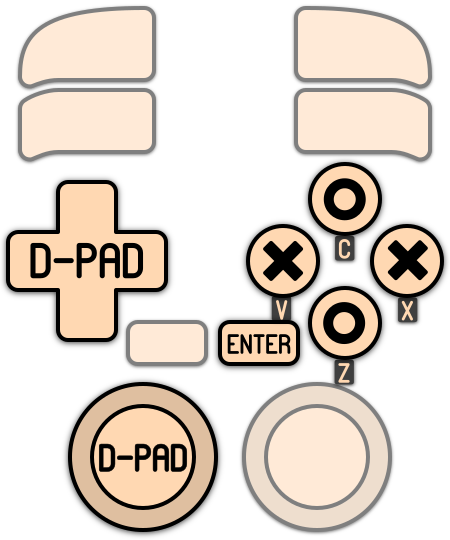
Keys inside the emulator: [START] or [HOTKEY] + opens the Pico-8 menu.
Troubleshooting
Further troubleshooting
For further troubleshooting, refer to the generic support pages.