Table of Contents
This article needs some TLC. Read at your own risk.

Naomi 2
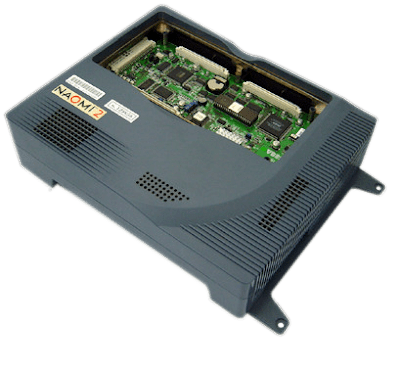
The Naomi 2 is a arcade developed by Sega. It was released in 2000.
A list of all the games made for it and their provided media format can be found at the Arcade Otaku Wiki page.
This system scrapes metadata for the “naomi2, arcade” group(s) and loads the naomi2 set from the currently selected theme, if available.
Quick reference
- Accepted ROM formats:
.zip,.7z - Folder:
/userdata/roms/naomi2
| Emulators |
|---|
| libretro: flycast |
| flycast |
BIOS
Any one of these BIOS files should work.
| MD5 checksum | Share file path | Description |
|---|---|---|
728bfe038ce280872057e365ebfc0fee | bios/dc/naomi2.zip | |
baf83367044924067e09856ba164aa6f | bios/dc/naomi2.zip | |
6f8ad6e3ab04c8ae1cbcaa652b91cf4e | bios/dc/naomi2.zip | |
f3f39513484df216d9979f6ae7577942 | bios/dc/naomi2.zip | |
ab046e62c51d67fb89eade2b8d5f6a8d | bios/dc/naomi2.zip | |
096a5217ff6e6c6cafe65a03336760ab | bios/dc/naomi2.zip | |
659d579ba9aef5b025d87323044e83f4 | bios/dc/naomi2.zip | |
cbe0984d03d73869c23da5a3dd2ce207 | bios/dc/naomi2.zip | |
b624ec7b3b90fdf3be103cdfb1679d1d | bios/dc/naomi2.zip | |
a9d82db14b823a5a57885bea1a998eb7 | bios/dc/naomi2.zip | |
3b1315be24dc8d17f4fa18f3bfc5fe5c | bios/dc/naomi2.zip | |
0143cf852cb2a8a41f217bc688f62105 | bios/dc/naomi2.zip | |
8b88c1f5a06e9b560e887c3b9f879237 | bios/dc/naomi2.zip | |
b49702e4fadb3b5f9143a3d20afd04b5 | bios/dc/naomi2.zip | |
ecadb008179ca1e6f4fe3fa091ab5df2 | bios/dc/naomi2.zip | |
edeed38a9795e062a9af28c3eba22040 | bios/dc/naomi2.zip | |
14e6bffff0d4dff6a5a547e7c43680ff | bios/dc/naomi2.zip | |
689d2228b00fb59781f82af6e8ecdb78 | bios/dc/naomi2.zip | |
8373a11106c1c2fc21ac839f75ea488f | bios/dc/naomi2.zip | |
7eecfb8e8f82b47ffab92a0c5528100e | bios/dc/naomi2.zip | |
960ece0dc22a7c5ff81c812a2993e7cc | bios/dc/naomi2.zip |
ROMs
Place your Naomi 2 ROMs in /userdata/roms/naomi2. Flycast uses the MAME ROMset.
Emulators
RetroArch
RetroArch has its own page.
libretro: Flycast
A fork of a fork of a fork… this is an identical version of standalone Flycast but inside of a libretro core. Makes use of RetroArch's features.
libretro: Flycast configuration
Standardized features for this core: naomi2.autosave, naomi2.use_guns, naomi2.cheevos
ES setting name batocera.conf_key | Description ⇒ ES option key_value |
|---|---|
| Settings that apply to all systems this core supports | |
SYNCHRONOUS RENDERING global.reicast_synchronous_rendering | Can avoid flashing screen issues. Significant performance cost. ⇒ Off disabled, On enabled. |
RENDERING RESOLUTION global.reicast_internal_resolution | Enhancement. Increase the rendering resolution. Makes 3D objects clearer. ⇒ 640×480 640×480, 800×600 800×600, 960×720 960×720, 1024×768 1024×768, 1280×960 1280×960, 1440×1080 1440×1080, 1600×1200 1600×1200, 1920×1440 1920×1440, 2560×1920 2560×1920, 3200×2400 3200×2400, 3840×2880 3840×2880, 4480×3360 4480×3360, 5120×3840 5120×3840, 5760×4320 5760×4320, 6400×4800 6400×4800, 7040×5280 7040×5280, 7680×5760 7680×5760. |
Target color for player 1. global.reicast_lightgun1_crosshair | ⇒ Red Red, Blue Blue, Green Green, White White, Disabled disabled. |
Target color for player 2. global.reicast_lightgun2_crosshair | ⇒ Red Red, Blue Blue, Green Green, White White, Disabled disabled. |
Target color for player 3. global.reicast_lightgun3_crosshair | ⇒ Red Red, Blue Blue, Green Green, White White, Disabled disabled. |
Target color for player 4. global.reicast_lightgun4_crosshair | ⇒ Red Red, Blue Blue, Green Green, White White, Disabled disabled. |
TEXTURE MIP-MAPPING (BLUR) global.reicast_mipmapping | Smooth textures on distant 3D objects based on angle. ⇒ Off disabled, On enabled. |
ANISOTROPIC FILTERING global.reicast_anisotropic_filtering | Improves clarity of distant textures when mip-mapping is enabled. ⇒ Off False, 2x 2, 4x 4, 8x 8, 16x 16. |
TEXTURE UPSCALING (XBRZ) global.reicast_texupscale | Enhancement. Upscales screen textures (2D games only). ⇒ Off False, 2x 2x, 4x 4x, 6x 6x. |
FRAMESKIP global.reicast_frame_skipping | Skip frames to improve performance, at the cost of choppy motion. ⇒ Off disabled, 1 1, 2 2, 3 3, 4 4, 5 5, 6 6. |
FORCE WINDOWS CE MODE global.reicast_force_wince | Required for some games. ⇒ Off disabled, On enabled. |
WIDESCREEN CHEAT (PRIORITY) global.reicast_widescreen_cheats | Enhancement. Only works with a 16/9 ratio and bezels disabled. ⇒ Off disabled, On enabled. |
WIDESCREEN HACK (GLITCHY) global.reicast_widescreen_hack | Enhancement. Only works with a 16/9 ratio and bezels disabled. ⇒ Off disabled, On enabled. |
CONTROLLER 1 TYPE global.controller1_dc | ⇒ Gamepad 1, Keyboard 3, Mouse 2, Light Gun 4. |
CONTROLLER 2 TYPE global.controller2_dc | ⇒ Gamepad 1, Keyboard 3, Mouse 2, Light Gun 4. |
CONTROLLER 3 TYPE global.controller3_dc | ⇒ Gamepad 1, Keyboard 3, Mouse 2, Light Gun 4. |
CONTROLLER 4 TYPE global.controller4_dc | ⇒ Gamepad 1, Keyboard 3, Mouse 2, Light Gun 4. |
Flycast
Flycast is a fork of Reicast (which itself is a fork of nullDC). A highly compatible and accurate standalone emulator.
Flycast can also be used to run Dreamcast home console games due to being similar hardware.
Flycast configuration
Standardized features available to all cores of this emulator: naomi2.videomode, naomi2.videomode, naomi2.bezel, naomi2.bezel_stretch, naomi2.hud, naomi2.hud_corner, naomi2.bezel.tattoo, naomi2.bezel.tattoo_corner, naomi2.bezel.tattoo_file, naomi2.bezel.resize_tattoo
ES setting name batocera.conf_key | Description ⇒ ES option key_value |
|---|---|
| Settings that apply to all cores of this emulator | |
SCREEN RATIO naomi2.flycast_ratio | Choose which screen ratio you want to use. ⇒ Default False, Widescreen True. |
RENDER RESOLUTION naomi2.flycast_render_resolution | Choose which internal rendering resolution you want to use. ⇒ 320×240 (Half) 240, 640×480 (Native) 480, 960×720 (x1.5) 720, 1280×960 (x2) 960, 1600×1200 (x2.5) 1200, 1920×1440 (x3) 1440, 2560×1920 (x4) 1920, 2880×2160 (x4.5) 2160. |
GRAPHICS API naomi2.flycast_renderer | Choose your graphics renderer. ⇒ OpenGL (Default) 0, Vulkan 4. |
ROTATE SCREEN 90 DEGREES naomi2.flycast_rotate | Rotate the screen by 90 degrees. ⇒ Normal False, Rotate True. |
ANISOTROPIC FILTERING naomi2.flycast_anisotropic | Higher values make textures viewed at oblique angles look sharper. ⇒ Disbaled (Default) 1, 2x 2, 4x 4, 8x 8, 16x 16. |
Controls
Here are the default Naomi 2's controls shown on a Batocera RetroPad:

Troubleshooting
I cannot deactivate "Free Play" in some games
Emulationstation as of v41 (and current v42_beta) has no switch to deactivate “Free Play” on the NAOMI and NAOMI 2 systems. You have to use Retroarch core settings according to the Wiki, see https://wiki.batocera.org/advanced_retroarch_settings.
Sadly, when setting “Free Play” to “OFF” in this Retroarch menu, the setting is ignored by most of the games.
To get this setting accepted, you have to access the “System Menu” of the NAOMI game in question and set “COIN/CREDIT SETTING” to “# 1”:
- Enter the Retroarch menu (when in game, Hotkey + South).
- Go to “Core Options” → “System”
- Set “Allow Arcade Service Buttons” to “ON” and “Set NAOMI Games to Free Play” to “OFF”
- Exit the Retroarch menu using “Restart”.
- When in game, press “L3” to enter the System Menu of the game. “R3” is used to navigate this menu, “L3” to select an entry.
- Navigate this way to “COIN ASSIGNMENTS”
- Set “COIN/CREDIT SETTING” to “# 1”.
- Exit the System Menu by selecting “EXIT” twice.
- Optionally you can now set “Allow Arcade Service Buttons” to “OFF” to prevent accidental entering of the game's system menu.
If “COIN/CREDIT SETTING” is set to “# 1”, the game in question will respect the Retroarch setting for “Free Play”, even if you set “Free Play” to “ON” in Retroarch again.
Further troubleshooting
For further troubleshooting, refer to the generic support pages.