Table of Contents
GT King/GT King Pro
Under construction

Batocera 40
Like most other supported hardware platforms, you can just burn Batocera on a SDCard, and boot from there. If you boot your GTKing on Android, you will have a menu to select boot on SDcard at the next boot.
Note: Batocera 40 supports wifi and bluetooth on GTKing (this has been a long struggle with previous versions).
Earlier versions of Batocera (36 and earlier)
There are multiple ways to do this. It is advisable to already be extremely familiar with flashing Android firmwares onto ARM-based TV boxes, as a lot can go wrong and it's very easy to end up with a bricked device. Be weary.
Big alert box to make you aware that there is a very high chance of bricking the device when attempting this. Once done there is no way to go back to how it came from the factory.
Method 1: Flash using the GT King itself booted into CoreElec or EmuElec
The GT King/King Pro comes with an 8GB SD card. It is recommended to throw this out and buy a new SD card that's at least 16GB for use with Batocera, as that satisfies the minimum size requirements if you need to use the card itself for Batocera. It may not be required, depending on your box. It is possible to flash over the firmware from the old card to the new one if desired, but here we will be using CoreElec (for the GT King Pro) or EmuElec (shipped with the GT King).
- Boot into CoreElec/EmuElec and copy the Batocera image over to somewhere easily accessible. The
/storagefolder is recommended. - Connect to the box via SSH.
- Run
ls. This will show the current directory, which can be used to confirm that the Batocera image was copied over correctly. In this example, the image isbatocera-s922x-gtkinpro-33-20220203.img. If you downloaded it in.gzformat, make sure you usegzip -dto unzip it before moving forward. - Then run
parted -lto see the partitions of the current drive. Note down which partition contains the 62.5GB internal storage (its “model” will appear asMMC CJNB4R) and its mounted location. In this example,/dev/mmcblk0.
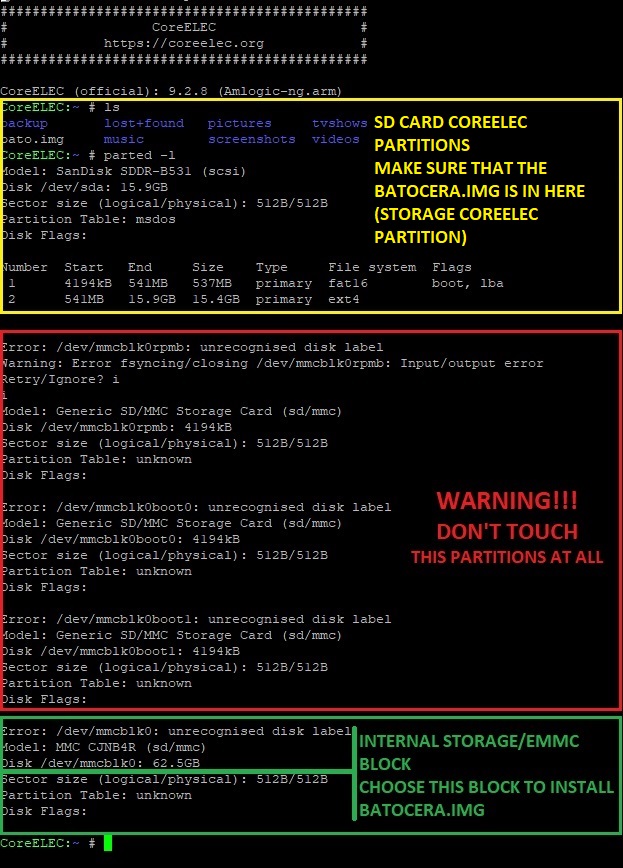
Going beyond this point it is possible to brick the device. Be 100% sure that all the information is correct and that you are aware of the risks.
- Once you have confirmed that the image is present and the correct internal eMMC block to install into, run the following command:
dd if=<path/to/image/file> of=<path/to/internal/emmc> bs=1M && sync
- In this example:
dd if=batocera-s922x-gtkinpro-33-20220203.img of=/dev/mmcblk0 bs=1M && sync

- Confirm that the Batocera image has been flashed by running
parted <path/to/internal/emmc> print:
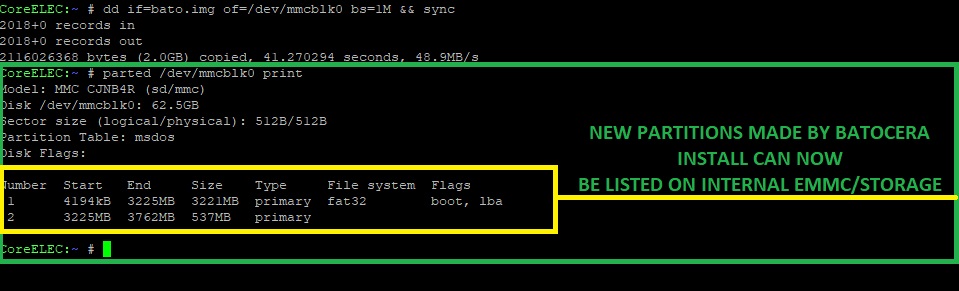
- Power down the device and remove the CoreElec SD card.


Booting into Batocera after using method 1
You have successfully flashed Batocera onto the internal storage. But now we need to boot it. Depending on the exact box, there could be various additional steps required. Try the following in the order specified:
- Just boot it up again. If it fails to boot, move onto the next step.
- While it is disconnected to the power, press the tv box reset button. While keeping it pressed down, connect the power. Once you see the Batocera splash screen, it is okay to release the button. If Batocera still does not boot, move onto the next step.
- Flash Batocera to the SD card, insert it into the box and repeat step 2.
If it still fails after this… RIP. You were warned.