Table of Contents
Choose a handheld
If you were after the more powerful (and expensive) x86-based handhelds, click here.
If you're after a more general introduction to handhelds, I strongly recommend giving https://retrogamecorps.com/ or https://www.rghandhelds.com/ a visit. Do note those websites focus more on handhelds in general, not Batocera, so the software included there is not supported here. This wiki page focuses solely on Batocera's compatible handhelds.
Console generations are referenced a lot throughout this. In no particular order:
| Gen | Consoles | Handhelds |
|---|---|---|
| 3rd | NES, Sega Master System, Atari 7800 | Not yet, unless you count Game & Watch. |
| 4th | SNES, Sega Genesis/Megadrive, Philips CD-i, Neo Geo, PC-Engine/TurboGrafx/SuperGrafx | Game Boy, Sega Game Gear |
| 5th | Sony PlayStation, N64, Sega Saturn, Atari Jaguar | Game Boy Color, Sega Genesis Nomad |
| 6th | Sony PlayStation 2, Microsoft Xbox, Nintendo Gamecube, Sega Dreamcast | Game Boy Advance, Nokia N-Gage, Neo Geo Pocket Color |
| 7th | Nintendo Wii, Microsoft Xbox 360, Sony PlayStation 3 | Nintendo DS, Sony PSP |
There's more but that's the gist. In terms of power required to run, consider handhelds to be a generation and a half behind consoles.
Ayn Odin Base/Pro

This device is not supported (yet).
The Ayn Odin Base/Pro is a Snapdragon-powered Android-based gaming handheld. Explicitly not the Odin Lite, as that uses a different CPU which is incompatible with Batocera.
Features
Pro-specific features indicated after the slash.
- Snapdragon SD845 Quad-core Kyro Silver at 1.8 GHz/Gold at 2.8 GHz
- Ardeno 630 at 787 MHz
- 5.98“ 1920×1080 16:9 IPS touch display
- 4/8 GB RAM
- Stacked shoulder buttons/analog triggers
- Two clickable sticks
- Two additional back function keys
- Dedicated hotkey
- 64/128 GB internal storage
- SD card slot
- USB C port
- HDMI port
- Stereo speakers
- 3.5mm headphone jack (on bottom)
- Volume rocker
- Rumble
Performance

Anbernic RGxx3
A collection of devices using the Rockchip RK3568 in various form-factors.
Supported devices:
- Anbernic RG-Arc-D
- Anbernic RG-Arc-S
- Anbernic RG353M
- Anbernic RG353P
- Anbernic RG353PS
- Anbernic RG353V
- Anbernic RG353VS
- Anbernic RG503
Devices running Android on the internal EMMC storage will no longer be supported with Batocera v42 or later.
The installed bootloader is not compatible with later Linux Kernels.
Therefore you will need to wipe the Android partition to boot into Batocera.
Instructions
WARNING - This will remove Android completely from your device.
- Install ADB on your computer if you don't already have it. See this guide: https://www.xda-developers.com/install-adb-windows-macos-linux/
- Power off the device and ensure the all sdcards are ejected
- Hold down power and volume down to get into Android recovery
- Connect the device to your computer via USB using the “DC” port on the device.
- Switch ADB into root mode using `adb root`. Note: You may get a timeout error here, continue on anyway.
- If you would like a backup of your Android partition, run `adb pull /dev/block/mmcblk0 android.img`
- Then, get to an ADB shell with the `adb shell` command.
- Wipe the internal EMMC Android partition using: `dd if=/dev/zero of=/dev/block/mmcblk0 bs=4M`
- This will take a few minutes and when it is done you will get an “out of space” message. This is normal.
- Exit the ADB shell using `exit`
- Insert your Batocera SD card, and run `adb reboot` to reboot the device.
- You should now be booting Batocera using the new standard bootloader.
Note: Support also includes Powkiddy branded devices using the same image:
- Powkiddy RGB10MAX3
- Powkiddy RGB30
- Powkiddy RK2023
Anbernic RG552

Anbernic ships this device with a “Linux” operating system that may or may not be an outdated, customized, broken version of Batocera packed with stolen ROMs. It is ill-advised to use this version, as it attempts to connect to Anbernic's non-existent servers for the content downloader, bezels, RetroAchievements, etc. which all obviously fail. Also, most of the emulators aside from the defaults are completely broken.
A premium (for ARM at least) handheld using the next gen RK3399 ARM CPU. Is capable of running both Android and Linux operating systems, using an active fan to keep the system cool (this can be disconnected if you prefer silence  ). It features high-quality build materials and is around the same form-factor as the Odroid Go Super.
Features
- 5.36” 1920×1152 5:3 IPS display
- Internal Wi-Fi
- Two clickable sticks
- Aligned L1/L2, R1/R2 buttons (digital)
- One additional function key (on bottom)
- 64GB internal eMMC storage
- Two SD card slots
- Two USB C ports
- HDMI port
- Stereo speakers
- 3.5mm headphone jack (on top)
- Volume rocker
- Rumble
Performance
Identical to the RockPro64, as that's what it is essentially.
Piboy DMG 3/4
Add more info.
Although no official build supports this device yet, an unofficial build is available at this Reddit post: https://www.reddit.com/r/PiBoy/comments/ncepzh/batocera_proof_of_concept/
The uploader has been maintaining this image for a while year so far as of writing.
Anbernic RG351MP
This device is not supported (yet).
This entry is under construction.
The culmination of the RG351P and RG351M, using a superior 640×480 screen. Has an operating system with EmulationStation installed by default so moving to Batocera's EmulationStation should feel familiar. Praised for its superb build quality.
Features
Performance
GameForce
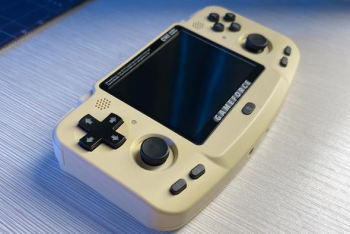
Neo Geo Pocket-inspired form-factor. Has some minor build quality issues (non-OCA screen, wobbly face buttons) but those issues can largely be ignored. Supported since v32. Plastic shell; comes in tan, green or orange.
Features
- 1.5GHz RK3326 CPU
- 3.45“ 640×480 IPS display
- Internal Wi-Fi
- Two non-clickable sticks
- Aligned L1/L2, R1/R2 buttons (digital)
- Backlit buttons (optional)
- Two additional function hotkeys (can be used for L3/R3 or volume)
- One SD card slot
- One USB C port
- 3.5mm headphone jack (on top)
- Stereo speakers
- No volume buttons (can be scripted to function buttons)
- Rumble
Performance
The 4:3 aspect screen lends itself to the systems it does well. Performs nearly identically to the Odroid Go Advance. It is capable of 5th gen and below well, though N64 has issues with specific games. Has very limited PSP support, some 2D games run well but 3D games are hit-or-miss. Dreamcast is “playable”, but sub 40FPS.
Powkiddy RGB10 Max/Max 2
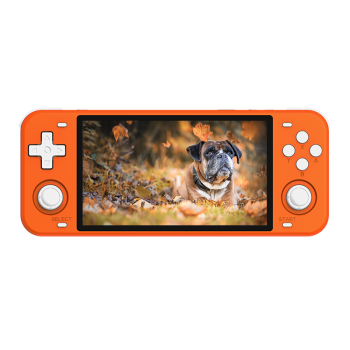
The upgraded version of the Powkiddy RGB10, featuring the same CPU. Build quality is great. Comes in black, orange or black-with-white-buttons.
A later model with a new shell (noticeably higher build quality) and refined buttons (notably stacked shoulder buttons instead of aligned ones) was released, called the RGB10 Max 2.
Features
- 1.5GHz RK3326 CPU
- 5” 854×480 IPS display
- Internal Wi-Fi
- Wi-Fi on/off switch
- Two clickable sticks
- Aligned (stacked on Max 2) L1/L2, R1/R2 buttons (digital)
- Two additional function keys
- One SD card slot
- Two USB C ports
- Mono speaker (despite there being grills for two)
- 3.5mm headphone jack (on top)
- Volume rocker
Performance
3x integer scale for GBA games uses the entire height of the screen. Despite switching to a 16:9 screen, performance is the same as the RGB10 non-Max. Most systems you run will be 4:3, you can use “core-provided” aspect ratio to use black borders. It is capable of 5th gen and below well, though N64 has issues with specific games. Has very limited PSP support, some 2D games run well but 3D games are hit-or-miss. Dreamcast is “playable”, but sub 40FPS. Here's a demonstration video by Sonic Love Emulation.
Anbernic RG351V
The Batocera build for this handheld is still in alpha and may have severe bugs/compatibility issues. You have been warned!
The build for this device has gone MIA. It is not compatible with Batocera at the moment.
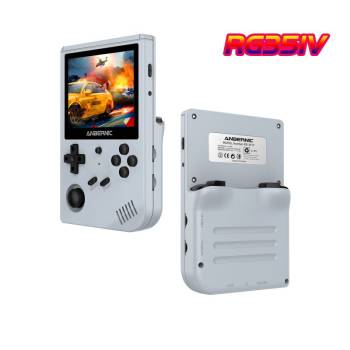
Not to be confused with the RG351P/M, which use an entirely different form factor. The long-awaited upgrade to the original RG300, uses the Game Boy-inspired shell with the internals of the RG351P. Slightly larger than a Game Boy Color. Has an operating system with EmulationStation installed by default so moving to Batocera's EmulationStation should feel familiar. Praised for its superb build quality. Plastic shell; comes in translucent grey, white or with a wood grain pattern.
Features
- 1.5GHz RK3326 CPU
- 3.5“ 640×480 IPS display
- Internal WiFi
- One clickable stick
- Aligned L1/L2, R1/R2 buttons (digital)
- One additional function button (can be used for Hotkey)
- Two SD card slots
- Two USB C ports
- Mono speaker
- 3.5mm headphone jack (on bottom)
- Volume rocker
Performance
Its 4:3 aspect ratio display lends itself well to 2x upscaling PS1 games. Performs nearly identically to the Odroid Go Advance. It is capable of 5th gen and below well, though N64 has issues with specific games. Has very limited PSP support, some 2D games run well but 3D games are hit-or-miss. Dreamcast is “playable”, but sub 40FPS.
Anbernic RG351P/RG351M

Not to be confused with the RG350P/RG350M, as it uses different architecture internally. Has an operating system with EmulationStation installed by default so moving to Batocera's EmulationStation should feel familiar. Praised for its superb build quality. The P (plastic) version comes in three colors, whereas the M (metal) version comes in silver or metallic red.
Features
- 1.3-1.5GHz RK3326 CPU
- 3.5” 480×320 IPS display
- Internal WiFi (M model only)
- Two clickable sticks
- Aligned L1/L2, R1/R2 buttons (digital)
- A single SD card slot
- Two USB C ports
- Stereo speakers
- 3.5mm headphone jack (on top)
- Volume wheel
- Rumble
Performance
Its 3:2 aspect ratio screen perfectly upscales GBA at 2x integer resolution, but other systems may have black borders, shrinking the screen size a little. Performs nearly identically to the Odroid Go Advance. It is capable of 5th gen and below well, though N64 has issues with specific games. Has very limited PSP support, some 2D games run well but 3D games are hit-or-miss. Dreamcast is “playable”, but sub 40FPS.
Odroid Go Super

A larger revision of the Odroid Go Advance, still using the same CPU at the same clock. Around the same size as the Switch Lite. There are still some minor build quality issues, but they can be largely ignored. Plastic shell; comes in translucent or grey.
Features
- 1.3GHz RK3326 CPU
- 5“ 854×480 IPS display
- No internal Wi-Fi
- Two non-clickable sticks
- Aligned L1/L2, R1/R2 buttons (digital)
- Four additional function buttons (can be used for L3/R3 and Hotkey)
- One SD card slot
- A USB C port and a full-sized (!) USB 2.0 port
- Mono speaker
- 3.5mm headphone jack (on top)
- Volume rocker
Performance
Despite switching to a 16:9 screen ratio and adding a right stick, the device still performs nearly identically to the Odroid Go Advance. It is capable of 5th gen and below well, though N64 has issues with specific games. Has very limited PSP support, some 2D games run well but 3D games are hit-or-miss. Dreamcast is “playable”, but sub 40FPS. Here's a demonstration video by LOE TECH.
Powkiddy RGB10/RGB10M

Basically a more polished version of the Odroid Go Advance/RK2020. Build quality is great. The metal shell comes in metallic black. The plastic shell comes in black, grey or yellow.
Features
- 1.5GHz RK3326 CPU
- 3.5” 480×320 IPS display
- No internal Wi-Fi
- One non-clickable stick
- Aligned L1/L2, R1/R2 buttons (digital)
- Two additional function keys (can be used for L3 and Hotkey)
- One SD card slot
- A USB C port and a full-sized (!) USB 2.0 port
- Mono speaker
- 3.5mm headphone jack (on top)
- No dedicated volume keys (can be added via scripting)
Performance
Performs nearly identically to the Odroid Go Advance. It is capable of 5th gen and below well, though N64 has issues with specific games. Has very limited PSP support, some 2D games run well but 3D games are hit-or-miss. Dreamcast is “playable”, but sub 40FPS. Here's a demonstration video by Sonic Love Emulation.
RK2020/RK2020-M

Basically a pre-assembled version of the Odroid Go Advance. Some would say a “clone”. First production units had a battery issue, but this was resolved in later manufacturing runs. Build quality is kind of crummy (visible seams, no passive heatsink) but is slightly better than that of the Odroid Go Advance. The plastic shell comes in translucent indigo or translucent black. The metal shell comes in black.
Features
- 1.3GHz RK3326 CPU
- 480×320 IPS display
- No internal Wi-Fi
- One non-clickable stick
- Aligned L1/L2, R1/R2 buttons (digital)
- One SD card slot
- A USB C port and a full-sized (!) USB 2.0 port
- Mono speaker
- 3.5mm headphone jack (on top)
- No volume buttons
Performance
Performs identically to the Odroid Go Advance. It is capable of 5th gen and below well, though N64 has issues with specific games. Has very limited PSP support, some 2D games run well but 3D games are hit-or-miss. Dreamcast is “playable”, but sub 40FPS.
Odroid Go Advance v1/Black

A do-it-yourself assembly case for the Odroid Go Advance board. Not to be confused with the Odroid Go, which uses a much weaker board and a Game Boy inspired form-factor. The original had a translucent case that could be easily dyed, the later v2 revision only came in black (and thus is referred to as the “Black” edition). The build quality of the original is kind of crummy (visible seams, no passive heatsink), but was improved with Black edition. The easiest handheld to physically modify due to compatibility with other button sets/ease of dyeing.
Features
- 1.3GHz RK3326 CPU
- 480×320 TFT display
- Internal Wi-Fi (Black edition only)
- One non-clickable stick
- Aligned L1/L2, R1/R2 buttons (digital) (L2/R2 added in Black edition only)
- Four additional function buttons (can be used for L3/R3 and Hotkey)
- One SD card slot
- One USB C port (v1 has barrel jack) and a full-sized (!) USB 2.0 port
- Mono speaker
- 3.5mm headphone jack (on top)
- No volume buttons (can be scripted to function buttons)
LED Control
Some people find the constantly flashing LEDs to be very intrusive. Here's how to turn them off:
This command will turn the blue LED to MicroSD card access:
echo mmc0 > /sys/bus/platform/drivers/leds-gpio/gpio_leds/leds/blue:heartbeat/trigger
and following one will turn it off completely:
echo none > /sys/bus/platform/drivers/leds-gpio/gpio_leds/leds/blue:heartbeat/trigger
To execute this code automatically at each startups, just put it on a text file and save it as /userdata/system/custom.sh
Credit to neko on the forums for this tip.
Performance
It is capable of 5th gen and below well, though N64 has issues with specific games. Has very limited PSP support, some 2D games run well but 3D games are hit-or-miss. Dreamcast is “playable”, but sub 40FPS. Most current handhelds use the same chipset at this board and thus has very similar performance to it.
Retroflag GPi Case

This case is essentially a Raspberry Pi Zero inside of a Game Boy-inspired case, and its performance is identical to the Raspberry Pi Zero. The first handheld supported officially by Batocera! Keep in mind that you will need to either buy one with a Pi Zero already installed or provide the Pi Zero yourself (without soldered pins)! May also be compatible with the CM3+ mod, but that has yet to be implemented/tested. Build quality is exceptional. The plastic shell comes in grey.
You can install the script to be able to use its power button by following the instructions on this page.
Features
- 1GHz ARM CPU
- 2.8“ 320×240 IPS display
- Internal Wi-Fi (Pi Zero W only)
- Stealthy L and R buttons
- A single SD card slot
- Two micro-USB ports
- Mono speaker
- 3.5mm headphone jack (on bottom)
- Volume wheel
- 3xAA battery powered
Performance
Performance is identical to the Raspberry Pi Zero, ie. it can do up to 4th gen consoles at full speed (with the help of some lesser-than-accurate emulators). 5th gen consoles is a stretch but possible with optimization of settings. Unfortunately it's missing some buttons/sticks for all later the systems it can run, but that can be worked around on a per-game basis or it might not matter at all if you only intend on playing 5th gen portable handheld games and below.

Retroid Pocket 5 / Retroid Pocket Mini
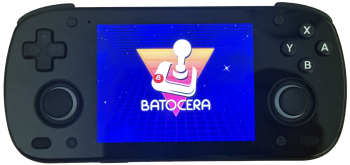
This is one of the most capable ARM-based handhelds, powered by a Qualcomm Snapdragon SM8250 SoC.
Features
- 2.8GHz SM8250 CPU
- Adreno 650 GPU
- RAM RPMini: 6GB LPDDR4 - Pocket 5: 8GB LPDDR4
- AMOLED Screen RPMini: 4:3 1280×960 (3.7 inches) - Pocket5: 16:9 1920×1080 (5.5 inches)
- Internal Wi-Fi 6 and BT 5.1
- 3D hall sticks
- Analog L2/R2
- Dynamic active cooling (
qcom-fanBatocera tool)
ABL Installation and Device Selection
*** Important: for Batocera v43 you need an updated bootloader ***
- On your Retroid device on Android or another device / OS.
- Download SM8250-ABL.zip and extract it to an sdcard.
- Boot Android ensure the you insert the sdcard with the extracted files.
- Using the file manager (Files) copy the files off your sdcard onto the Android file system into a directory called odin2_custom_abl (this directory name is important).
- To ensure you're using the correct location to create the odin2_custom_abl directory. In the File app, hit the hamburger symbol on the top right (three lines) and then choose your device (i.e. Retroid Pocket 5)
- Go to Android settings, at the bottom in the Handheld settings → Advanced → Run script as Root and select the backup_and_flash.sh script from the directory called odin2_custom_abl.
- The script will run quickly and back up the original boot loader to /sdcard/backup/ directory.
- Keep this as a backup in case you want to rollback.
- Power off, you're ready to install Batocera
Batocera Installation
- Download the Batocera SM8250 image and burn it on an micro SDCard. Warning: make sure you have a high quality SDcard.
- Enter the bootloader fastboot menu by pressing
[vol -]and[power]and switch the Boot Mode to Linux (use volume buttons and power to navigate and select). - Then navigate to Set device model (You only have to do this once). There you can choose your device from the list. Finally navigate back to 'START' and press power to boot.
- If you want to go back to Android, remove the SDCard (optional), boot while pressing
[vol -]and[power]and change the Boot Mode back to Android.
Performance
You can emulate up to 6th gen consoles. The screen of the RPMini with its 4:3 aspect ratio is particularly comfortable for older systems.
Retroid Pocket 6
This is a new capable ARM-based handhelds, powered by a Qualcomm Snapdragon SM8550 SoC.
Features
- Qualcomm Snapdragon 8 Gen 2 processor (1x Cortex-X3 @ 3.2GHz, 4x Gold, 3x Silver)
- Integrated Adreno 740 GPU @ 680MHz
- RAM: 8GB or 12GB LPDDR5x RAM
- Storage: 128GB or 256GB UFS 3.1 storage (expandable via MicroSD)
- Screen: 16:9 5.5-inch AMOLED touchscreen, 1920×1080 resolution, 120Hz refresh rate, 550 nits brightness
- Connectivity: Wi-Fi 7, Bluetooth 5.3, USB-C (OTG & 4Kp60 DisplayPort output), 3.5mm jack
- Battery: 6,000mAh with 27W fast charging
- 3D hall sticks
- Analog L2/R2
- Dynamic active cooling
- Dimensions/Weight: 210 x 86.6 x 17.2 mm; 320g
ABL Installation and Device Selection
*** Important: for Batocera v43 you need an updated bootloader ***
- On your Retroid device on Android or another device / OS.
- Download SM8550-ABL.zip and extract it to an sdcard.
- Boot Android ensure the you insert the sdcard with the extracted files.
- Using the file manager (Files) copy the files off your sdcard onto the Android file system into a directory called odin2_custom_abl (this directory name is important).
- To ensure you're using the correct location to create the odin2_custom_abl directory. In the File app, hit the hamburger symbol on the top right (three lines) and then choose your device (i.e. Retroid Pocket 6)
- Go to Android settings, at the bottom in the Handheld settings → Advanced → Run script as Root and select the backup_and_flash.sh script from the directory called odin2_custom_abl.
- The script will run quickly and back up the original boot loader to /sdcard/backup/ directory.
- Keep this as a backup in case you want to rollback.
- Power off, you're ready to install Batocera
Batocera Installation
- Download the Batocera SM8550 image and burn it on an micro SDCard. Warning: make sure you have a high quality SDcard.
- Enter the bootloader fastboot menu by pressing
[vol -]and[power]and switch the Boot Mode to Linux (use volume buttons and power to navigate and select). - Then navigate to Set device model (You only have to do this once). There you can choose your device from the list. Finally navigate back to 'START' and press power to boot.
- If you want to go back to Android, remove the SDCard (optional), boot while pressing
[vol -]and[power]and change the Boot Mode back to Android.
Performance
You can emulate up to some lower end 7th gen consoles.