Table of Contents
Batocera's File Partitions
Userdata filesystem options
It's helpful to become familiar with how Batocera has its partitions laid out first to better understand what you're accessing and where they are located.
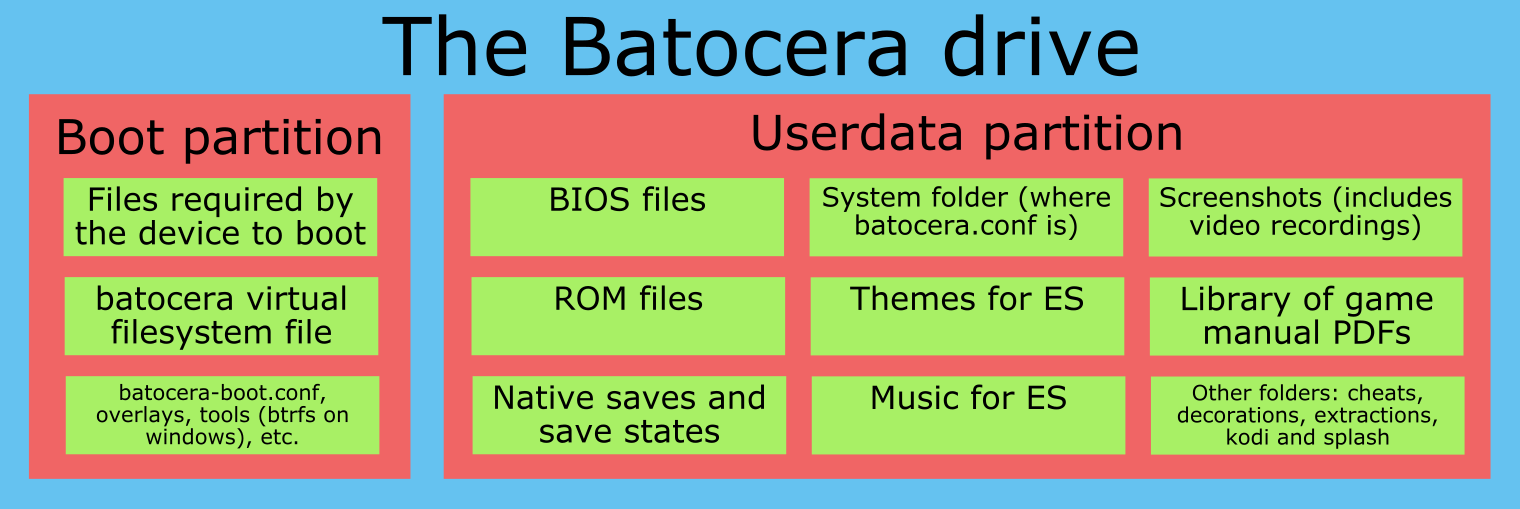
Batocera uses two main partitions: the boot partition and the userdata partition.
The boot partition is what appears as the FAT32 partition when you plug the drive into another system (this will be the only visible partition to Windows by default). This is where Batocera contains all the files necessary to boot Batocera on your device. While Batocera is running, it is mounted to the /boot/ folder, but its original location is simply / on the FAT32 partition. It is not usually necessary to edit this partition (except for editing a few settings in the batocera-boot.conf file if required).
The userdata partition contains “the rest”, all the ROMs, BIOS files, saves, configuration (including batocera.conf), etc. This is referred to as either userdata or share interchangeably (in reference to it being the default path the network share points to), they both mean one and the same thing. This is designed to be portable between all versions of Batocera, even Batocera builds running on different platforms (granted, weaker platforms like SBCs won't magically gain the ability to play ROMs for emulators they don't have). Refer to the attached image below:
Using an alternative filesystem for userdata
You are free to use a variety of filesystems for the userdata partition. The best filesystem to use depends on your situation and what capabilities you need/restrictions you can deal with. The boot partition should not be reformatted to a different filesystem (your particular platform may depend on it).
Here are the options available for the userdata partition:
- ext4 is the default userdata partition filesystem. If you own other Linux systems, you're probably already comfortable with it as they have access built-in. No major restrictions, except this cannot be read directly by Windows by default, though it is still possible to add files to this file system from Windows using a special program/drivers. This issue can be worked around if you have network access.
- btrfs is a newer option. If you have Windows machines, Batocera comes with the
btrfs_for_windowsdriver on the boot partition to allow Windows machines to read a BTRFS userdata partition. This issue can be worked around if you have network access. No restriction when using BTRFS, except you can't read it natively with MacOS. Performs slightly slower than ext4, but is better at protecting corruption from files such as during a power cut mid-transfer. - NTFS is an OK option - Windows, MacOS and most Linux distributions can directly read NTFS just fine. Sophisticated systems (such as WINE for Windows applications, Steam, Cemu for Wii U, Future Pinball, Flatpak, etc.) may have issues when using this due to certain file attributes not being properly stored and no compatibility with symlinks when being read by Linux. Has no real file size restrictions (that you'd feasibly run into).
- FAT32 and extFAT are outdated filesystems. Yes, they are well supported under most OS's (you bet, those filesystems are over forty years old!) but they have restrictions in terms of maximum file size (FAT32 cannot store files larger than 4GB, which most 6th gen and above console ROMs exceed) and the ability to support the exec bit or file permissions required to run certain Linux applications - for instance you won’t be able to log through SSH easily. It will also limit the use of certain emulators and systems that rely on features like symbolic links or special character filename handling, neither of which are possible with FAT32 or exFAT. Amiga or Wine/Windows are popular systems that won't work well with these filesystems. However, these systems involve the least amount of writes when creating files, therefore would increase the longevity of short-lifespan storage such as USB flash drives. Although this becomes less an issue as flash storage lifespan improves over time of manufacture.
To summarize in a table:
| Filesystem | Writable by Linux OSes? | Writable by Windows? | Writable by MacOS? | Issues with emulators | File size restrictions | Notes |
|---|---|---|---|---|---|---|
| ext4 | Yes | Not by default | No | None | None you'd feasibly reach | Some protection against file corruption. |
| btrfs | Yes | Not by default | No | None | None you'd feasibly reach | More protection against file corruption, but slightly slower than ext4. |
| NTFS | Yes | Yes | Not by default | Some (any that rely on symlinks, special character/case-sensitive filenames or certain permission bits) | None you'd feasibly reach | Minimal protection against file corruption. |
| exFAT | Yes | Yes | Yes | Many (really, only 4th gen and below systems are guaranteed to still be functional) | None you'd feasibly reach | No protection against file corruption. Is however the best for USB flash storage, as it uses the least amount of writes (increasing longevity of the drive). |
| FAT32 | Yes | Yes | Yes | Many (really, only 4th gen and below systems are guaranteed to still be functional) | 4GB (lower than DVD disc images) | No protection against file corruption. Not recommended under any circumstances, exFAT is superior in every way. |
You can reformat the userdata partition of the storage device you are using to ext4, BTRFS or exFAT using Batocera's built-in formatting tools. Go to SYSTEM SETTINGS → DEVELOPER → FORMAT A DISK. Of course, when you format a partition, you lose everything that was on it. So, backup your userdata (ROMs, saves, etc.) before doing this!
If you're handy with formatting partitions, you can always format the partitions yourself and manually install Batocera.
Buildroot
Batocera.linux is based on buildroot. You can see buildroot as a minimal Linux distribution which maintains base packages. Its focus is on being firmware for embedded systems, but is flexible enough to allow for more complex projects such as Batocera. Batocera.linux mainly includes extra packages not available by default in Buildroot (emulators, front-end GUI, additional drivers for devices, etc.) and configuration.
More information about Buildroot can be found here: https://buildroot.org.
The Batocera firmware and its overlays
The partition named BATOCERA visible on any computer under Windows, MacOS or Linux is the system. It is a partition formatted in FAT32, a filesystem supported by almost every OS and boot system (BIOS legacy or UEFI).
The three most important files on the boot partition are:
linux, the technical system (about 10 MB)batocera, the software system containing all the programs (about 2 GB compressed)initrd.gzoruInitrd, the loader (about 600 kB)
Upgrading the system means mainly that these three files are getting upgraded. There may be some other files depending on the architecture.
The file batocera can be seen like a firmware, you cannot directly modify it. However the architecture is a bit more complex and allows you to add “adjustments” to modify the firmware without recompiling everything: batocera.linux supports and uses by default overlayfs. The real system is the firmware (the file batocera) and a filesystem in memory initialized with the file overlay if it exists. The overlay is an in-memory filesystem and not directly the overlay file because under Linux, you cannot properly unmount the root filesystem, mainly when it's a complex root from several filesystems.
As a general rule, the file overlay doesn't exist, unless it's created by the script batocera-save-overlay if a user or developer customizes the system.
+--------------------------------+
| TMPFS, writable                | --> must be saved explicitly on /boot/overlay
+--------------------------------+
| firmware (squashfs), read only |
+--------------------------------+
More details on overlayfs can be found here : http://embedded-computing.com/guest-blogs/understand-what-an-overlayfs-is-and-how-it-works
SD card / EMMC / USB key / Hard drive
When you create the card to run batocera.linux, the card is more complex than a basic card, and it's dependent on the architecture. It's why you need a special tool to burn it.
- BEFORE BOOT: these are technical files to be able to access the BOOT partition and run the Linux kernel.
- BOOT: this partition is visible on Windows. This is where the batocera.linux system is.
- FREE: this free space is filled with a SHARE partition on the first boot to save all the user data (ROMs and ancillary files like screenshots, video snaps and so on).
- SHARE: this partition replaces FREE at the first boot. It is partitioned as EXT4 by default, but you have other options depending on the usual OS you have on your other computers. See the chapter “Userdata file systems” below.
RPI SD CARD
      1                  1263
+-----+-------------------+--------+--------------+
| MBR |                   |  BOOT  |     FREE     |
+-----+-------------------+--------+--------------+
     512                 631K
X86/X86_64 USB KEY/HARD DRIVE
      1                  1263
+-----+-------------------+--------+--------------+
| GPT | SYSLINUX          |  BOOT  |     FREE     |
+-----+-------------------+--------+--------------+
     512                 631K
XU4 SD/EMMC CARD
      1      31      63          719     1231    1263
+-----+-------+-------+-----------+--------+-------+----------+--------------+
| MBR |  bl1  |  bl2  |   uboot   |  tzsw  |       |   BOOT   |     FREE     |
+-----+-------+-------+-----------+--------+-------+----------+--------------+
     512     15K     31K         359K     615K    631K       1.2G
C2 SD CARD
      1       97         1281
+-----+-------+-----------+--------+--------------+
| MBR |  bl1  |   uboot   |  BOOT  |     FREE     |
+-----+-------+-----------+--------+--------------+
     512     48K         640K
The rest.